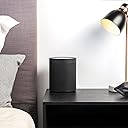
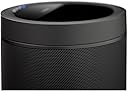
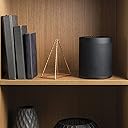
🎶 Elevate your audio game—because basic sound is so last decade!
The Yamaha WX-021 is a premium 40-watt 5.1 channel wireless Bluetooth speaker featuring a powerful subwoofer and Alexa voice control. Designed for immersive surround sound, it offers a 32-foot wireless range and a sleek tabletop form factor, perfect for millennials seeking high-quality, smart audio experiences that blend seamlessly into modern living spaces.


| ASIN | B07CK93ZZF |
| Age Range Description | Adult |
| Antenna Location | Music |
| Audio Driver Type | Dynamic Driver |
| Audio Output Mode | Surround |
| Best Sellers Rank | #716,595 in Electronics ( See Top 100 in Electronics ) #4,208 in Bluetooth Speakers |
| Box Contents | bluetooth speaker |
| Brand | Yamaha |
| Brand Name | Yamaha |
| Colour | black |
| Compatible Devices | Smartphone, Tablet |
| Connectivity Protocol | Bluetooth, Wi-Fi |
| Connectivity Technology | Bluetooth, Wi-Fi, wireless |
| Control Method | Voice |
| Customer Reviews | 4.1 out of 5 stars 271 Reviews |
| Frequency Response | 40 Hz |
| Global Trade Identification Number | 00027108957302 |
| Is Waterproof | false |
| Item Weight Unit of Measure | 2.18 kg |
| MP3 player | No |
| Maximum Range | 32 Feet |
| Model Name | WX-021BL |
| Model Number | WX-021BL |
| Mounting Type | Tabletop Mount |
| Network Connectivity Technology | Bluetooth, Wi-Fi, wireless |
| Number of Audio Channels | 5 1, 5 1 channel |
| Number of Items | 1 |
| Power Source | ac |
| Product Features | Subwoofer |
| Series Number | 21 |
| Speaker Maximum Output Power | 4 Watts |
| Speaker Size | 20.07 Centimetres |
| Speaker Type | Tweeter, Woofer |
| Specific Uses For Product | Music |
| Tweeter Driver Diameter | 1 Inches |
| UPC | 027108957302 |
| Unit Count | 1.00 Count |
| Warranty Type | Limited |
| Wireless Technology Type | Bluetooth |
P**S
Quality Product
The Best one from Yamaha
R**A
Expensive but worth it
I bought the soundbar yas 408, a month back and was very impressed with the sound quality. However I was missing the wow factor. Now added the two music cast speakers and I am pleasantly surprised with the amazing surround sound experience. The only downside is that these are very expensive. I suggest all owners of the music cast sound bars to invest in the surround speakers to enjoy the high quality immersive experience
R**R
Poor documentation for setup, administration and resolving surround pairing
I am writing this review around a Yamaha musiccast WX051 pair + YAS408 - trying to setup the WX051 pair as surrounds for the YAS408. Even though this product is a WX021 the concepts I write about should help here. I benefitted by reading some of the customer experiences on this product. My first post here. I read this full thread because I started having trouble with adding a pair of WX051 as surrounds to a YAS408 Bar. They kept failing with errors 6000B0000, 600b30000, 600330000. Some history here. I had a single WX051 which used to pair as surround with the YAS408 easily. I never had any trouble unpairing and pairing it as surround. Then I got a second WX051 to make a real surround with the YAS408. I noticed the surround setup kept failing. Actually I had not use the first WX051 as a surround with the YAS408 for a few months. I tried the singleton WX051 as a surround with the YAS408. It failed. That was puzzling. I knew that worked well flawlessly. Then I came to this forum and read all the posts. Instead of static IPs I made sure my DHCP server will assign reserved IPs for my two WX051 and one YAS408. This is as good as static IPs. This also did not work. Then it struck me I had done one change in my home network. In my home I have two WiFi access points. Initially I used to have separate SSIDs on both Wifi access points. In fact I also had separate access points for 2.4G and 5G. Earlier I had configured my single WX051 and YAS508 on the SSID given to the 2.4G. I had trouble with my laptops and phones as I moved around the house and often they would not shift to the stronger SSID. After reading some stuff on Wifi, I decided to make both my access points use the same SSID (including 2.4G and 5G). This definitely helped my roaming inside the house. (NOTE both Wifi access points are just ethernet-wifi radios. The DHCP server was common from a router to which both access point connected). When I started testing with the second WX051 I did not realise my Wifi topology had changed. I realised that it is quite likely my YAS408 was probably connecting to access point 2 (it is in a location where both access points have nearly similar signal strength) but the WX051 was connecting to access point 1. (both using same SSID also same SSID for 2.4/5G and both access points in the same IP subnet). I read here and in one Amazon customer feedback that the Yamaha devices establish their own ad-hoc network. I argued that if the Yamaha devices are not connected to the same access point they refuse to form the adhoc network - because Yamaha in their design must have assumed that such Wifi arrangement will only happen when there are large distances - and in such cases there was no way surround can be created. So I switched off all Yamaha devices. Switched off my distant Wifi Access point and powered on my Yamaha devices (two WX051 and one YAS408). Went back to the musiccast app on the phone and trie setting up surround on both WX051. IT worked in first attempt without any issue. Once the surround was setup, I went back and turned on the second access point. No problem with surround working. Conclusion : I think for the Yamaha to form its adhoc network for surround, it expects all its devices are talking to the same Wifi Access point Radio.
B**.
Subtle surround speaker
Surround speaker, unobtrusive!
N**W
Love these speakers!
The Yamaha Music Cast system is fantastic! These small speakers sound great and are soooo easy to set up. I now have a few in various rooms and have whole-house wireless music without drilling and running wires through attics and under the home. Did I mention they are soooo easy to set up? No, these are not massive, large speakers that will fill a huge room with driving bass by using just one speaker. They are what they are -- excellent smaller speakers well under $500 that sound great and are perfect for a typical-sized room in a house. They are good looking, discrete, and are easily tucked away within room decor. I put two on opposite corners of rooms and the rooms sound wonderful. I added a subwoofer in the larger living room next to my entertainment center. It's like I now live inside a big speaker shaped like a house, and the music comes from everywhere when I walk from room to room. It is exactly what I wanted and am very pleased. I have always found Yamaha audio equipment to be top notch. I also found the Music Cast app so easy to install on my phone and use. Don't know why some other people have said it is difficult to use. They must work for the competition and are planting negative reviews. I can easily use the app to control the volume speaker-by-speaker, use EQ settings speaker-by-speaker, set up presets with all speakers and levels already set up and accessible by choosing the correct preset number, or I can use presets to have certain speakers off when I want to listen in only one room downstairs and not bother other people upstairs, I can turn on and off the AV receiver and all speakers with the press of one button, can access Pandora and Spotify (those are the ones I use) without turning on my Smart TV or Blu-ray, can skip songs, make playlists, give thumbs up and down to songs, etc., etc, all from the app on my phone. I also have had no problems at all with music cutting in and out like some people have commented. That must be due to them having a poor wifi signal problem. I have a Netgear Orbi wifi system with satellites in two places throughout my two-story home. My wifi signal is fine and the speakers have not cut in and out or lost signal at all. Ever. Not even once. Remember, if you start adding six or more speakers, plus a wireless AV receiver, and have your cell phone set on wifi to control the app and the speakers, you have just added eight or more devices onto your wifi system, in addition to all the other devices that were already using your wifi. So, make sure you have a good wifi signal and all will be fine. So far, I am VERY happy with these Yamaha speakers and their Music Cast system.
S**N
Steps to add Speakers to 5.1.2 Surround Sound
Great speakers once you get them connected, the problem is that was a huge headache for me (at first). So much so, that I spent 3 days tinkering with these and my wireless network settings to no avail, only to box everything up in frustration with the intent on sending it all back. Fortunately, once I cooled off and waited for the holiday weekday to pass I called Yamaha, and thankfully they got me working. Initially, I could only get one speaker to add to my wireless network, but the second speaker simply would not add. I thought maybe it was a bad speaker, so I exchanged it at the store, but sure enough the new speaker also would not connect. After 3 days of trying, I finally called Yamaha, and they said it was common, and that a better method was available (though not in any manuals or guides). SO, if you are pulling your hair out trying to get your receiver and two speakers to connect for rear surround sound, here is the EASY way (using a receiver and two speakers): 1) HARD WIRE the receiver over ethernet and add it to the Yamaha Music Cast app. 2) Temporarily HARD WIRE the first speaker via ethernet as well, then add the device in the music cast app (give it a specific name like “Surround Left”) 3) Click on the SPEAKER in the music cast app, and go to information > network settings (then notate the IP address) 4) Open a browser on your PC, and go directly to the IP address of the speaker 5) Click on network settings 6) Click on "wired" and it should let you change it to "wireless" 7) Enter the SSID, security type, and password of your wireless network, then click OK 8) Disconnect the ethernet cable, & reboot the speaker (it should connect on its own over wireless now) 9) Now REMOVE the speaker from the music cast app altogether 10) Since the speaker is still connected to your wireless network, you should be able to reconnect it back into the music cast app by holding down “connect” on the top of the speaker for 5 seconds. 11) Repeat steps 2-10 with the second speaker 12) Once the receiver and two speakers are showing up in the app, CLOSE the music cast app completely (swipe up on an iOS device) 13) Re-open the app, click on the receiver, choose "music cast surround speakers" and now add the two speakers. 14) Once you see the “successful” message you should be set with wireless surround. Why these speakers have so much trouble being added wirelessly, or why Yamaha does not add the above steps in their manual is beyond me, but now that everything is connected properly they work great! ALSO: While the advertisement of the Yamaha Receiver and these speakers say they only work in 5.1 setups, the receiver DOES allow adding two extra "front presence" (i.e. height) speakers, making it 5.1.2 ....... (which is basically like 7.1), FYI ****** 8/6/19 UPDATE ***** I noticed after a while the speakers began going "in and out" occasionally. To fix this (which may have been overkill, but it worked for me) I moved everything wireless in my house to my 2.4Ghz "N" network, and reserved my 5Ghz "AC" network for nothing but these speakers. I also put a network extender in the room where these speakers are, so that the signal was uninterrupted through walls. Once I did those two things they've never once sounded choppy. Hope this helps others =)
J**A
Massive regret
I bought 2 of these and a new Yamaha receiver solely for the idea of having wireless rear speakers. It was a waste of money and time. They do work ok, and sound ok, but lost configuration data constantly with no indication other than the lack of sound. The fix for that if you have already made the mistake of buying: Power off, Hold volume up and volume down for 5 seconds, Hold power off connect for 3 seconds, Reset up in app. After the 20th time you start asking if this movie is worth the hassle - shortly after that you stop asking and just have some expensive clutter.
M**N
Great Wireless Speaker for Yamaha MusicCast Systems
Integrates well with my Yamaha RX‑A2080 receiver. I didn’t want to run wired speakers to my walk‑in closet and restroom, and the MusicCast 20 wireless speaker solved that perfectly. The sound is great, and it connects easily to my iPhone. I only purchased one, but I can see how these would work well as rear or presence speakers. It definitely saved me money by avoiding ceiling speakers. The price is fair for the quality — you get what you pay for.
Trustpilot
2 weeks ago
1 month ago