Desertcart purchases this item on your behalf and handles shipping, customs, and support to Senegal.
๐จ Elevate your digital canvasโcreate like a pro, anywhere, anytime!
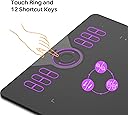
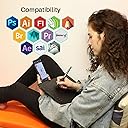
The HUION HS610 is a 10x6.25 inch ultra-slim drawing tablet featuring 8192 levels of pen pressure sensitivity and ยฑ60ยฐ tilt support. Compatible with Windows, macOS, and Android 6.0+, it offers 12 customizable express keys and a multifunctional touch ring for enhanced productivity. Lightweight and portable at 600g, it includes a battery-free stylus with 5080 LPI resolution, delivering precise, natural drawing experiences for professionals and creatives on the move.


| ASIN | B07NZ4181M |
| Active Surface Area | 10x6.25 inch |
| Additional Features | 60ยฐ Tilt Support, Extra-Slim, Programmable Press Key, Shortcut Key |
| Best Sellers Rank | #38 in Computer Graphics Tablets |
| Brand | HUION |
| Built-In Media | Digital Pen, HS610 drawing tablet, OTG Adpater, Pen Holder with Pen Nibs*8, USB Cable |
| Color | Black |
| Compatible Devices | Desktop, Laptop, Smartphone, Tablet |
| Connectivity Technology | USB |
| Customer Reviews | 4.5 out of 5 stars 1,858 Reviews |
| EU Spare Part Availability Duration | 1 years |
| Item Dimensions L x W | 6.25"L x 10"W |
| Item Weight | 0.6 kg |
| Manufacturer | ShenZhen Huion Animation Technology Co., LTD |
| Mfr Part Number | HS610 |
| Model Name | HS610 |
| Model Number | HS610 |
| Native Resolution | 10*6.25in |
| Number of Items | 1 |
| Operating System | Android 6.0 and above, Linux(Ubuntu), Mac OS 10.12 and above, Windows 7 and above |
| Pressure Sensitivity | 8192 levels |
| Screen Size | 10 inches |
| Special Feature | 60ยฐ Tilt Support, Extra-Slim, Programmable Press Key, Shortcut Key |
| Specific Uses For Product | 3D Modelling, Animation & Desiging, Drawing |
| Target Audience | Student, Teacher, Toddler |
| Warranty Description | one-year warranty |
J**Z
Easy to install, works wonderfully, and highly customizable.
Considering this is at such a reasonable price, I am impressed by the quality and ease of installation. The pen tablet is nicely designed, and there is so much you can customize, saving lots of time in working.
J**Y
Great Affordable Tablet
I just received this graphics tablet as a replacement for my Intuos 3 which had its pen disappear. So far I am actually super impressed with the HS610. It came in a very nice high quality box with good presentation which reminded my of an apple product. The Tablet itself is much more solid than I was expecting; especially compared to the Intuos 3. The Pen is nice, but it is not as hefty as I would have liked. The buttons are well located though unless you hold the pen at the tip. Some misc thoughts on drivers and specs: I downloaded the 2021/01/30 driver for windows from the company website. The driver utility allows you to - Assign the tablet to individual monitors or all monitors. It even allows you to define a custom area (say if you wanted to leave out the toolbars in photoshop for example). Another feature that surprised me after reading many of these reviews, is the ability to remap the keys on the tablet. You can also reassign the buttons on the pen. It also appears that you can create per program profiles, although I have not tested that functionality. The pen sensitivity is adjustable based on a curve so you can configure how you want the pen to respond fairly easily. Ctrl+alt+H pulls up the tablet settings if you can't find them for some reason. A couple specs from the box that I don't remember reading in the description: pen resolution: 5080 LPI reading height: 10mm Oh, people have complained about the usb port on the tablet. All I can say is treat your things better! unplug the cable before you put the tablet in a backpack. The port is reasonably well constructed and the cable plugs in quite firmly for me. I have it plugged into a usb hub and it was detected with no problems. I am using this tablet with a 27inch 4k monitor, and I feel like it is the perfect size. I do not know if I would want one this big for a smaller monitor. For a laptop with no external display I would strongly consider a smaller model. I will come back and update after using it for a while if I remember.
M**U
Impressed by the Ease of Install
Way bigger than I thought and that's wonderful! To date, this is the biggest tablet I've ever owned. Even on my poor late 2013 Macbook Pro it was compatible. Granted, I looked up the driver manually but after a quick download, the tablet has been working beautifully. It's wonderfully responsive (feels a little like drawing with frosting). I'm looking forward to a grand couple of years working with this tablet. I'll let you know how long it lasts! The texture is there, akin to a fine grain paper. There were extra nibs included in the stylus holder! Clever design. Interested to see how long the nibs last me. I would recommend mapping your keys and stylus buttons to your liking as soon as possible to build muscle memory (if you're new to it like me). There's good suggestions on youtube.
C**E
It's great, but incapable with my 7.0 Android phone model.
This is a fantastic tablet. It's very very thin, which worries me over fragility, but it does have some heft to it. There are so many buttons that I don't know what to do with them, but I'll use more as I go along. The touch sensor is very sensitive and there's no way to change that. But it is very useful for zooming in and out. If you click the center button, it gives you the options for what you're using it for, so that's handy rather than going into the settings and changing it every time. The pen is fantastic, I love that it doesn't need to be charged, it is also very lightweight. MY ONLY PROBLEM, AND SUGGESTION FOR ALL WHO ARE INTERESTED IN THIS TABLET: RESEARCH IF YOUR PHONE IS USB CAPABLE!!! I had this problem, I bought the tablet, and I had previously used a USB with my phone. My phone is Android 7.0. However, my particular model did not support OTG, the needed system function to have the tablet work on your phone. Look into your phone BEFORE you get this tablet. Of course it works flawlessly on a computer or laptop, the sensitivity coordinator in the program is fantastic, especially for setting your preferred type. I was so excited to be able to use this tablet on plane trips or anywhere with my phone, but since I conveniently discovered my phone is incapable of doing so, I have to revert back to the laptop and tablet. This is a fantastic tablet, but do research on your phones capabilities before you get this tablet, if you plan on getting it purely for the use on your phone.
M**H
Good quality good price
The quality is very good I bought this as a gift for my best friend because she does digital art and she has gotten very accustomed to using after only having it for a couple of weeks so it is pretty easy to pick up and learn!
S**E
Better than I expected
This is my first Huion tablet and have been using an Wacom Intuos 4 for many years. My Intuos 4 has been showing age and I wanted to see what Huion had to offer. This tablet has all the features I absolutely needed (wheel for zooming in/out, many buttons, preferable size, non-rechargeable pen) and the sensitivity works great. I couldn't find any reference to the Huion driver software, so I was delightfully surprised to see that it offered almost as much as Wacom. Pros: โข Software nearly comparable to Wacom - Sensitivity adjustment, Tablet Rotation (you can turn it 180 if you're a lefty), Key customization โข Lightweight - The tablet weights almost nothing, as does the pen. โข Buttons - So many buttons! The soft buttons are an awesome addition as well. โข Sensitivity - I had to adjust the pen through the driver software, but the pressure ranges were apparent and worked well. I'm definitely satisfied with this performance. โข Wheel - The zoom in/out is very fluid albeit a bit too sensitive at times. When you press the center button, the label of what is "selected" pops up on the bottom of the screen very lightly. (See image with "Adjust Brush Size") โข On/Off indicator light - I didn't even know there was one and it is so tiny that I thought it was a spec of dust or paint at first. I can appreciate it though! โข Surface feel - Very smooth with a bit of a textured surface, like paper. โข Nibs - A decent count. I try not to draw too hard and wear through them so they'll certainly last me. โข It just works! Cons: โข Software - There are limits to it. You cannot customize the wheel settings. I barely saw the label on the screen whispering which selection I'm on. I would love to make that a big darker, or bigger. Wacom also offered "on-screen controls" with there buttons, which I'm going to miss. Huion doesn't have that type of option that I can see. The maximum customization you have is "Keyboard Combination Keys", "Mouse Button", "Switch", and "Shell program", which is still a great feature. Thankfully I have 12+16 customizable keys to work with and adapt with. โข Light indicator - So small! Like the size of a pin hole! But not a big issue. โข Soft buttons - Before I rotated the tablet 180, I was having a heck of a time trying to use the soft buttons. When my pen went over to the soft button area, it wouldn't press the button, instead it would move the mouse to that area on the screen (as if the soft buttons were "active drawing area") and click on the screen - which was annoying. After the rotation, the soft button area was no longer "active drawing area" and worked properly and without a hitch. โข Wheel - Extremely sensitive with no way to turn it down. If my palm brushes just over or slightly against it, as if I were reaching over to the mouse, it would activate and zoom in/out. It's an adjustment if anything. โข Lightweight - As wonderfully light and portable as this may be (which I don't plan on transporting it), its lightness makes me worry about the longevity of it. Usually lighter electronics don't tend to last long, or are just in general very fragile - but I will try to update if/when it kicks the bucket. โข Port - You only get one port and the USB piece that attached to the table is heckin small. Fragility is the theme here. I only worry with this because I had to retire my Intuos because BOTH the ports eventually gave up. Meaning I had 2 ports - one broke a few years later (unfixable unless I wanna pay $100+ probably), so I had to use the other one, and few years after that that one broke as well. I'm not rough with my electronics, but - especially when these don't have specialized, protective cases - things happen over 5+ years and bumps occur. This truly worries me for this itty bitty little port and connector. Overall, I love this tablet. I do worry about how long it will last, but at this time, it is an amazing value for the price ($63.99 before tax - preorder sale). I have found no heavy, glaring, impacting faults at this time. Even though I have quite a bit of con's, I don't think it's fair to give it 4 stars because those con's are not mistakes of a broken product, and the few lacking features are to be expected for the price (Huion $63 vs Wacom $250+). This product works through and through and I am extremely satisfied.
S**N
Still own a Wacom Intuos 3, and this is better
I have an old Wacom Intuos 3 I bought a decade ago. The intuos never worked very well with any of my computers. In photoshop it refused to implement pressure and seemingly the drivers would stop working randomly, forcing me to restart. Finally I chose to purchase the Huion HS610. I was trepidant, but at a little over $40, I wasn't risking much. I was very careful to download the correct drivers and uninstall any Wacom drivers I might have had on my rig. Almost immediately it worked flawlessly. The pressure control is very good, the shortcuts work (aside for a couple that don't but it's an issue with my software, not the tablet. For instance, I shortcutted Ctrl-SFT-Alt-S (Save for web), and that works great. However, Ctrl-T (Transform in PSD) refuses to work. Beats me why. It works in another software I have with the same shortcut for the same job. Strange. Other than that, I am thrilled with this tablet. It's smaller than my Intuos, but that's a plus. It's light and easy to handle. I added some tall rubber feet sso I can place it over my keyboard, but that's my preference. It's definitely a good tablet. I am thinking of buying a smaller one for my laptop (Which has a touchscreen and a pen, but it doesn;t work in Photoshop, which is crazy, but it has nothing to do with this tablet). I am happy with this. I have been using it almost daily since I bought it a few months ago and I haven't had any issues with it. A few more shortcut keys would be nice, but for the price it's fantastic. For the record, I had an old ipad Bluetooth slim keyboard and I rigged it to stay above the tablet on my drawing surface (A variable incline I built with pressboard and hinges). That's a lot easier tha n suing the regular keyboard for shortcuts I can't fit on the tablet. I even have a keyboard the size of a cellphone and I have integrated that too in my drawing/editing workstation. TL;DR: It's a very good drawing tablet.
R**.
A BIG Winner if this thing works in the long run.
I was hoping that this would be a good thing, and first appearances, it seems to be exactly what I need. I used to be Photoshop Retoucher and used full-sized Wacoms, meaning, 12"x12", and I have had several (personal ones) that size and smaller. So, the way I used them was mostly for retouching, although I am also an artist and used it for that, but, I was never one to need all of that foo-foo stuff it had available to users. This, right out of the box is all that I need. The ONLY reason that I upgraded was my old Wacom (6"x9") would not work on my new laptop with Windows 11. (I still used Windows 7!) :) Although this is slightly smaller than my Wacom was, it's fine, and it works as smoothly as my Wacom, so, I am actually really happy with this thing. Now, since I bought mine the price has gone down from $52.00 to $44.00, but, even if this thing quits on my in a year, I can buy several more of these rather than pay the price of a similar Wacom. So, hopefully this thing lasts for awhile, it'd really be nice if it did. All I did after I removed it from the box was to plug in the USB cable and it worked! Wacom was never that easy, well, the older ones that I had. So, a REALLY good price, it seems to be solid, and it feels very good in my lap, and the controls (that I need) work fine, too. The Touch Sensitivity is good, for my needs, I don't need any foo-foo stuff, so it's fine, I can't speak for others that use this, of course. I think that if you just need a tablet and pen, you cannot go wrong on this deal, you should be happy enough, I'd think, I know, I am!
C**A
Bom demais
Simplesmente muito bom, construรงรฃo muito boa, quando comprei achei que os botรตes eram de baixa qualidade, mas nรฃo sรฃo, sรฃo bons, a superficie dele รฉ muito agradavel pra desenhar, achei que seria lisa, mas ela tem uma textura mto boa, e รฉ bem grande, o melhor custo beneficio que encontrei e cumpre td que promete! Recomendo, e recomendo a imports br tbm, tava previsto pra chegar atรฉ 18/10 chegou 16/09, foi taxado pela alfandega e eles pagaram a taxa no mesmo dia! melhor experiencia atรฉ agora com compra online!
ุน**ู
ู ู ุชุงุฒ
ู ู ุชุงุฒ
U**L
Lightweight, Precise, Worth For Price
Amazingly cheap deal for beginners, only feedback to manufacturers is to replace micro-usb port with type-c port since microusb is not as durable as typeC...
P**R
Huion HS610 for photo editing
I can highly recommend the Huion HS610 drawing tablet for photo editing. (In the past I used the basic Wacom Intuos tablet which has only 4 physical buttons along the top). I found the Huion to be fantastic to use with 12 physical buttons, a wheel and 16 soft keys. The pen is slightly heavier than the wacom but it feels better quality and more comfortable to use. I use the Huion tablet with a program called Capture One and it works great and have setup all the physical keys from top to bottom with brush, erase, radial, gradient - wheel (brush size) , zoom in, zoom to fit, crop, straighten, denoise and export.
M**Y
Recommend
Good. Size is big and the the screen has friction so you feel your using a normal paprr. Recommend
Trustpilot
1 month ago
2 weeks ago