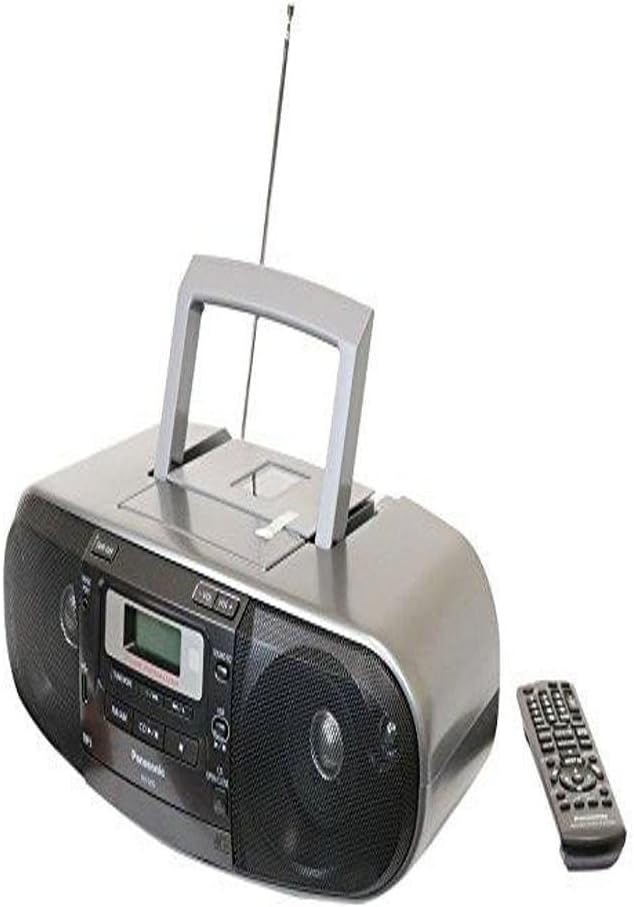
🎶 Power your nostalgia with modern versatility — sound that commands attention!
The Panasonic RX-D55 is a high-power 280W boombox featuring a 2-way 4-speaker system for natural surround sound. It supports multiple playback options including CD, cassette, USB, and AM/FM radio with 16 presets. Enhanced with MP3 Re-Master and Sound Virtualizer technology, it offers customizable EQ settings for tailored audio experiences. Designed for both vintage cassette lovers and digital music fans, it combines classic recording capabilities with modern connectivity in a sleek, portable design.


| ASIN | B004L0JI94 |
| Batteries | 2 AA batteries required. |
| Best Sellers Rank | #178,743 in Electronics ( See Top 100 in Electronics ) #279 in Boomboxes |
| Customer Reviews | 4.1 4.1 out of 5 stars (1,606) |
| Date First Available | January 26, 2011 |
| Is Discontinued By Manufacturer | No |
| Item Weight | 10.14 pounds |
| Item model number | RX-D55GC-K |
| Manufacturer | Panasonic |
| Product Dimensions | 10.67 x 16.06 x 5.83 inches |
L**R
My long winded take/review :-)
I like the build quality but the sound to me varies with the type of music that is played and what medium that music is played on. For example playing Classical music via CD the clarity is superb in my book. A piano solo sounds fantastic via CD. Turn on the sound virtualizer and the piano jumps out at ya. Playing a quality and well recorded normal bias tape sounds wonderful as well. There will be a slight tape hiss since this unit does not have Dolby A,B,C or HX Pro noise reduction. I believe that is not a failt of Panasonic but rather that Dolby has stopped issueing license rights for Dolby NR on Cassette decks. Playing music via the USB sound OK but not mind blowing as the Quality of MP3's even at 320 are OK but not the same as the way the CD sounds. CD is lossless non-compressed audio compared to Lossy compressoon of MP3, that would be the reason why. Playing device over the (music port) aka (line in) works just fine however! :-) if using the earphone out of a media player such as an iPad, iPod or iPhone care should be taken with the volume of the device. It is easy to cause the input signal to clip and a noticeable 'POP' and 'Crackle' sound will be a result on certain parts of a song with high BASs or high TREBLE. After I found the right sweet spot volume wise with my iPod the sound was actually pretty good. Jimi Hendrix sounded awe-some with the sound virtualation enabled. Can some one say 'Wide-Stereo' mode of the high end boomboxs of the mid to late eighties! Now back to the sound quality, The lows are some what lacking fullness. No matter what eq setting , there are only 5 available settings (Heavy, Clear, Soft , Vocal or EQ OFF) The BASS is somewhat lacking. There is some but not that solid BASS I get from my old school Pasonic from the late 80's now keep in mind that the speakers in this unit according the the owners manual are 8 CM or 3.149 inches. And a 1.5 CM .59 inch ceramic tweeter. Where my 80's box has 12 CM or 5" in drivers. So one can not expect too much after all this is not a Bose system not at this price. As far as clarity CD's, Quality well recorded tapes sound awesome as long as its not a BASS heavy track! Same for devices on the aux in/ music port depending on the quality of the music recording/format/ encoding/ compression etc etc example don't expect too much from a 64kbp mp3. Most of the music from my iTunes collection sounded pretty good. USB playback this all depends on the same factor as far as the compression/sample rate of the MP3. Too bad Panasonic only Made support for MP3 play back and not support for AIFF, WAV and FLAC. That would have allowed for some great sounding tunes via USB at the cost of space of course. . Also recording From the CD to the Cassette on a quality Maxell normal BIAS tape sound great for a normal type 1 casstte. The radio, FM reception is very good and sensative. I was picking up distant stations but with much static as this unit does not seem to have the old school 'Distant/Local' setting that helped pulling in far away stations (distance mode) or attenuating strong local stations (Local mode). Inwas able to use the receiver with out pulling out the antenna. I also happen to be in a good location for reception. There will be an exaggerated static hiss sound when tunned into a weak station or one that is way to strong with the Sound Virtualizer function on. I found it better to turn off the Sound Virtualizer in those situations. I find the Sound Virtualizer works best on CDs, quality recordings on tape as well as quality recordings on a media device. Recording your own voice, well this unit does not include a built microphone like boomboxes of the past. But if you get the right adaptors and a mic preamp along with a microphone you can use the music port and simply adjust the audio out of the mic preamp so there is no clipping and the audio input on the mic preamp properly you can acheive a decent recording. But be warned keep the volume low on the radio as it will squeel since the radio will act as a live monitor to the input signal via the music port. It will squeel! Not a pleasant thing for your ears and could hurt the speakers too if too loud. With that said, Over all I think this is a great value for the price and all that it has to offer. I just hope and oray it lasts me a while. My last system (non Panasonic ) the CD player quit
P**R
Exceptional Quality Complete Compact Stereo
Review updated December 8, 2022 I now have two of these units, and will comment on both. This is a high-quality compact stereo system. There are 10 watts to each speaker whereas cheaper units come with only 1-3. The manual is detailed. Take care of the remote, you will need it for certain functions. To turn the player on, push the AM/FM button. To turn off, push TAPE/OFF. The sound quality is very good ... however, this player excels in playing music. The vocal audiocassettes and CDs I have require tweaking the equalizer, as the native sound tends to be a bit too muffled. The first one of these I have, via the headphone jack, is connected to older larger Bose powered speakers to excellent effect. There are several presets to tweak for various kinds of sound. The most basic are five equalizer presets: "heavy", "soft", "clear," "vocal," and "off." You can independently tweak the bass and treble. The virtualizer feature projects sound, and there is a "re-master" option, which reproduces the frequencies lost during recording. ... RADIO: You may want to install four fresh AA batteries to back up radio presets in case of power outage. If you do that, diary to check batteries every so often. I found the AA batteries leaking a year before the date they were stamped to expire. I don't use the larger batteries, just the AC cord. There are 16 presets each for AM and FM. Start by tuning to the lowest radio frequency. On the remote, hold the forward arrow button down for a second and it finds the first station. Say you want a preset there; press "program"; then the number buttons to assign a number to it (eg., press #1) and that is your preset. Push the forward button to find the next station you want; press "program" then the number buttons (eg., #2). Alternatively, you can use the "auto preset" button and presets for the strongest stations in your area will automatically be set. To listen to a station, press its number on the remote's keypad. Update on the radio: Now having another of this boombox to use in another room, I've discovered that indeed the radio reception tends toward the weak side. I'd thought it was just the location of the first one (plus that I'm not in the perfect location buildingwise for radio reception), however, trying out the newer Panasonic in another room still fails to achieve strong reception. ... CD PLAYER: This is full-featured. You can start on any track, program the order of tracks, skip tracks, and repeat the CD. Use the remote to program the CD player or the Play button on the unit to just play it. Con: I find it inconvenient that this boombox does not turn itself off after playing a CD. ... USB DRIVE, MAX 8 GB SIZE: The main thing I've used on this unit is the USB port and flash drives to play MP3 music. Back in the day, we could hear about 5 songs on one side of a 33 RPM and then wait for another one to flop down from the spindle. Contrast that with listening to hundreds of songs that play automatically. When you turn off the player, it remembers where it was on the USB drive and takes up in that place, as long as the unit stays connected to power. There are a couple of ways to get music onto the USB flash: 1) Synchronizing with Windows Media Player - In Media Player, you can rip CDs to your computer as MP3s, enhance the quality of the MP3s up to the maximum (320 KBPS) and add to a flash drive. 2) Direct copy and paste of each MP3 - In this method, you insert the flash drive into the computer's USB; open My Computer; open the flash drive; open your Music folder; copy and paste the files - just the music files not the folders and sub-folders - into the flash drive window as you would any other window. Adding Auto Volume Leveling to Music on USB Flash Drive: When listening to music, do you ever find that one song will be too quiet so you turn it up, then the next will be too loud, so you have to turn it down again? Adjusting music volume is called leveling, normalizing, or changing the gain. When it works, the overall volume is similar from song to song without coming in at different volumes. Windows Media Player has Volume Leveling available but these features don't transfer to your flash drive. If you're somewhat "tech savvy," you can use a free program called MP3Gain. Google MP3 Gain for the You Tube demo videos and the website.If you install MP3 Gain, please read the Help file first; I recommend setting it so that your original copy is not overwritten but a new copy is made with the gain adjustment. Or just keep a backup copy of your music library. If you like the program, please make a small contribution to the author. Update on USB Function: After several years, the USB player stopped playing the songs that normally played at the end. Unsure why this happened. To solve this, purchased a San Disk Clip Jam MP3 player and copied my music to it; attached it to the Pana via the 3.5 mm "Music Port", and the result sounds fine, plus, the Clip Jam holds more music and has extra features. ... AUDIOCASSETTE PLAYER/RECORDER: If, like me, you have the older cassette tapes, it is getting hard to find players for them anymore. This unit has that capability. Unlike cheaper players I have, the Panasonic handles even the longer tapes (longest I have is about 50 minutes on each side). ... If you have read this far, thank you for reading, and hope this has been of some help to you. Enjoy the music!
P**T
I bought this product to have music when my expensive hifi system has issues and leaves me without music in my house. Wanted a radio, cassette & CD player with possibility of plugging my iphone as the unit does not have bluetooth. The unit came from the US to Australia and played without faults from set up. For the money ( it cost me one tenth of my speaker cables), I was not disappointed. Loved to hear my old cassettes that were recorded on a Nakamichi tape deck 20 years ago....they sounded very good. Cd and radio also sound good; heaps of features on the handset. Only thing to be careful of is that you must ensure the power selector on the bottom of the unit is on the correct voltage for your country e.g. 240V as it is in Australia. User guide can be read on the web before purchasing. Well recommended.
B**9
This boombox is performing very well. It has excellent sound for a smaller unit, and fills the room with reasonably good quality sound. One option I like is the inclusion of a cassette deck. Some of us older listeners still have dwindling libraries of cassette-recorded material, so it's a plus. The CD playback has a tray-type drawer, which I feel may increase the reliability of this type of system. All of the boomboxes which I had in the past failed on CD's due to the top load mechanism lid failing to lock down once the CD was loaded into the player. You had to resort to placing heavy objects on the lid to get a playback of your CD's. I hope that the tray-type load-up is more dependable than the older spring and catch lids seen on the older or cheaper boomboxes.
G**M
En resumen: Una porquería, no te arriesgues, no lo compres! Te cuento: Recién lo desempaco y no encendió, pensé que era un problema de alimentación de corriente: el cable, el selector de voltajes que trae (120-220V) o un fusible interno abierto, de todos modos supuestamente Amazon los vende como nuevos y deberían funcionar perfectamente, iba a hacer la devolución pero ya no regresan el total del monto pagado debido a los impuestos de importación que son como $500 pesos mexicanos, así que decidí intentar repararlo yo mismo (soy ingeniero). Lo abrí y después de desmontar sus partes internas y revisar los circuitos cuidadosamente uno a uno como por 5 horas, me di cuenta que la tarjeta principal de la fuente de poder estaba rota, tuve que soldarle un puente con un alambre de cobre, lo probé y ya con eso encendió. En fin, pensé que al ser Panasonic sería un producto de muy buena calidad, pero es todo lo contrario, estos los hacen en Indonesia y su personal seguramente no tiene cuidado a la hora de hacer los ensambles, esa tarjeta se debe meter con mucho cuidado, ya que dónde va metido es muy estrecho porque está la bocina, al montarla, seguramente rompieron esa tarjeta que es la que suministra la corriente eléctrica a todos los demás componentes. Pienso que Amazon me pudo haber mandado la devolución de otro cliente, porque según yo, estos equipos se prueban desde la fábrica, y la falla era muy obvia de detectar. A pesar de este gran inconveniente, el equipo tiene características técnicas y de audio muy buenas, pero si no tienes conocimientos técnicos, no te arriesgues, no lo compres, el tuyo tampoco podría funcionar y deberás repararlo desde nuevo, como yo lo hice.
S**N
Awesome sound and more than enough volume for me IMO. The only thing I was disappointed with was the 10> on the remote. If you have a few hundred tunes on an MP3 player, you can only go up to 99 and after that you have to skip forward one song at a time. If you last listened to #250 you'll need to skip one song at a time (about 5 sec each tune to skip) to increase by one to get to #251. I haven't figured out a fix yet, unless you keep the boombox on. That the only thing I can fault.
B**G
Expensive but good.
Trustpilot
2 days ago
1 month ago