Desertcart purchases this item on your behalf and handles shipping, customs, and support to Senegal.
🔥 Level up your game with precision and style 🎯
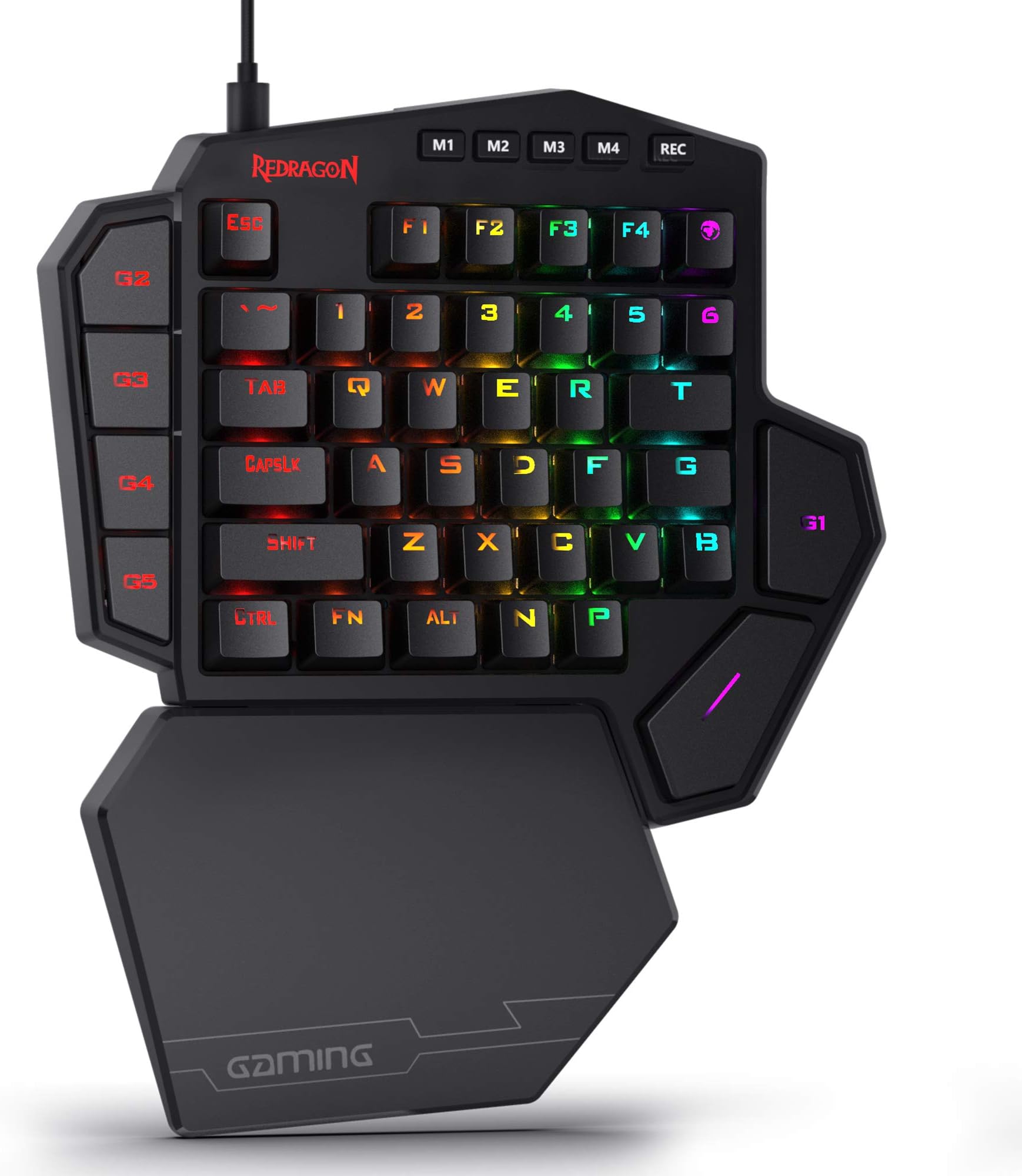
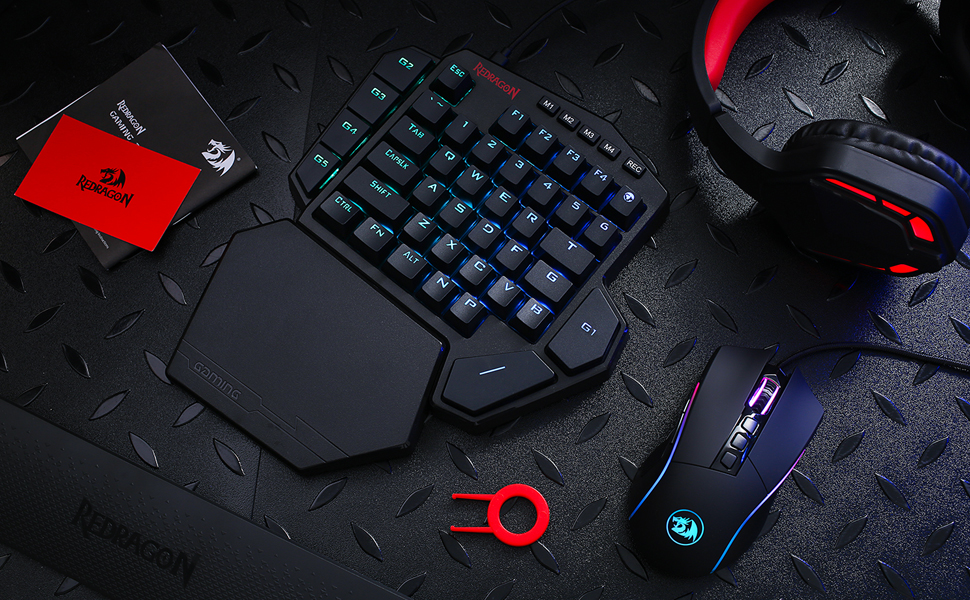
The Redragon K585 is a wired, one-handed mechanical gaming keypad featuring a compact 42-key layout optimized for MMO and MOBA players. It offers 7 programmable macro keys across 4 profiles, hot-swappable switch sockets compatible with most mechanical switches, a USB pass-through port, and a detachable magnetic wrist rest for comfort. With 16.8 million RGB colors and customizable lighting modes, plus powerful software for macro and lighting customization, it’s designed to enhance gaming performance and desk aesthetics.


| ASIN | B07NBJVH4G |
| Additional Features | 42 Keys One-Handed, Compact For Gaming, Extra Onboard G Keys, Wrist Rest |
| Antenna Location | Gaming |
| Best Sellers Rank | #708 in Video Games ( See Top 100 in Video Games ) #80 in PC Gaming Keyboards |
| Brand | Redragon |
| Built-In Media | Keycap/Switch Puller, Spare Switches, USB Cable |
| Button Quantity | 5 |
| Color | Black K585 |
| Compatible Devices | Laptop |
| Compatible Operating System Family | Android, Linux, Windows |
| Compatible Tablet Computer Models | AAUB P30 |
| Connectivity Technology | USB-C |
| Customer Reviews | 4.4 out of 5 stars 7,466 Reviews |
| Enclosure Material | Acrylonitrile Butadiene Styrene |
| Hand Orientation | Ambidextrous |
| Item Dimensions L x W x H | 10.3"L x 8.5"W x 2"H |
| Item Type Name | gaming keyboard |
| Item Weight | 1.3 pounds |
| Keyboard Backlighting Color Support | RGB |
| Keyboard Description | Mechanical, Gaming, Macro |
| Keyboard Layout | QWERTY |
| Manufacturer | Redragon |
| Mechanical Keyboard Switch Model | Blue |
| Mfr Part Number | 711210126 |
| Minimum Required Operating System Version | Android 13.0 |
| Model Name | DITI |
| Model Number | K585 WIRED |
| Number of Items | 1 |
| Number of Keys | 42 |
| Number of Packs | 1 |
| Number of Sections | 5 |
| Power Source | Rechargeable Battery |
| Recommended Uses For Product | Gaming |
| Series Number | 585 |
| Special Feature | 42 Keys One-Handed, Compact For Gaming, Extra Onboard G Keys, Wrist Rest |
| Style Name | Gaming |
| Switch Type | Clicky |
| Theme | Gaming |
| Unit Count | 1 Count |
| Warranty Description | / |
D**D
Amazing and game changing product
This gamepad is so comfortable! It may not look that way with the wrist block but I promise you it helps so much and feels better than it looks. Programming it is very simple and being able to program multiple key inputs up to the millisecond in punch time to just one key helps a lot with combos or drop shotting in fighters or first person shooting games! This think is incredible for the price and I bought a second one because my wife liked using it so much.
A**.
Highly Programmable, Sturdy, Very Useful
So I have to say, this thing is pretty cool. The build quality is surprisingly very sturdy with relatively heavy plastic. The Blue Switch keys sound great and press well. The magnetic palm rest is really nice. The extra USB port is handy. Couple things to note about the product. The cord is USB C into the keyboard and USB A into your PC. You can program the 7 macro keys (G1-G5, ~ and T) by using the keyboard itself (though only with keys that already appear on this left-handed keyboard), OR you can download software from manufacturer's website that allows you to program ALMOST every key (FN key, Rec key, and maybe one or two others excluded). This latter software method is good if you want to reprogram any of the normal letter keys or if you want to program a key to use a key NOT on this keyboard already (example: Windows key or Enter or any right-side characters or arrow keys). There are 4 layers or modes you can have (accessed via the M1-4 keys), so you can theoretically have a 4 sets of keys programmed. You can set the RGB LED color setting for each layer/mode as a visual clue for what layer/mode you're active on, which is really handy. It does not have a Windows key, which I wish it did, but using the software method you can program another key to be the Windows key (though unfortunately you can't reprogram the FN key for this purpose). The size of the keyboard is larger than I expected, but it's good. The optional key re-programming software is decent. The bottom space key is easily accessible for my thumb. The right top G1 key, though, is not so comfortable for thumb press and I'll need to use my index finger for that one. The top right key (right of F4) is the m character (though a few programs read it like an F5) and I guess has special meaning in some games or something. Overall, this is really quite nice. It can easily be used as a macropad or shortcuts-specific extra keyboard too, which is cool. Have to say, the ~$30 spent on it seems well worth it.
R**E
punches above its weight
The Redragon K585 DITI is an entry level mechanical keyboard that punches above its weight. That doesn't make it perfect for everyone, however. Look, it's pretty clear just by looking at this keyboard that it isn't a full keyboard. That intrinsically limits its target audience. For someone with ample desk space, this might not make the most sense as a purchase. But, on the flip side of that, for those with LESS space than usual, this can accomplish a very crucial goal of getting you back some of that valuable desk real-estate for your mouse, or other peripherals. For instance, in my case, I needed more room for gaming. One of the problems I kept running into with my existing setup was that during an intense firefight, I would sometimes slap my mouse on the side of my keyboard, resulting in, almost always, poor results. And after trying for many months to get used to playing with my full-sized keyboard tilted at a 45 degree angle, it just became worth the $35 dollars or so to get rid of the hand-pain that induced and solve the mouse conundrum in a combo meal. On the other hand, I could also see this being fairly useful for something like Asesprite, GIMP, or other design-oriented programs and tools. While I'm sure that there are people that could easily use the full spread of a full-sized keyboard with macros and still need more room, I'm not one of them, and I think it's fair to say that someone reading a review about this keyboard for that reason probably isn't either. So, what sets this keyboard apart from the competition? The biggest thing for me has been the remappable buttons. With 5 dedicated macro-keys and two other keys that you have the *option* to remap (tilde and T), you've got 7 total keys to customize. There are severe limitations to this that can ultimately hamper that usability, but we'll come back to that later. If you're someone that's into RGB, the keyboard lets you choose from 5 arrangements of color patterns that can range from what you'd expect from a typical RGB rainbow-vomit experience, to more subdued patterns that only appear when a key is pressed. To Redragons credit, the depth and color coverage is absolutely outstanding. It absolutely cannot be understated, in comparison to my Corsair RGB keyboard, the colors are just better on the K585. There's even some hidden gems as far as features go, too. While you can change the color mode using the four dedicated mode-buttons atop the keyboard, this *also* serves as a convenient and quick way to swap between different macro bindings on those 7 macro keys. But, if someone were to decide that they wanted to change the color mode but not lose their bindings, they could just as easily use the function key and space key to cycle between the modes of their own volition. Additionally, the keyboard has a detachable Type-C cable, so in the off chance that your cable got ruined, you would no longer be in the market for a whole keyboard, but just a cable. It also features an extra USB slot on the back that you could use for presumably anything a normal USB Type 2 slot could be used for, like a full keyboard if you needed that extra range, a wireless headset adapter, or just a convenient place to charge your phone. So now we've covered the good, but what about the bad? Are there any "gotchas" to this product? That's a question with some complicated answers that mostly come down to your use case. For me, one of the biggest issues with the device was the limitations behind the macro recording. As you can only record buttons that are available on the device itself, it makes rebinding almost mandatory for some games. In Destiny 2, as an example, I have my social tab bound to my O key normally, but as the K585 doesn’t have an O key, it makes opening that menu kind of a chore. My options at that point were to either change which keyboard I was pressing keys on for only specific keys, or just rebind these actions. Luckily, Destiny 2 has two binding settings for each action, so I was able to set most of these crucial actions to be the F1 through F4 keys as their fallback binding, in the off chance that I wanted to use a full-sized keyboard for any reason. *But*, even this has consequences. If you’re playing a game that doesn’t have multiple binding options, or rebinding at all, you’re just going to be out of luck. On top of that, if you’re someone that uses the alt-key for whatever reason, you could potentially run into issues with either accidentally or unintentionally using ALT+F4 to close your game or program of choice. Ideally, passing a keyboard through the K585 would allow it to register these macros as any press, like how a lot of keyboard or mouse macro software works already. Of course, the K585 doesn’t have any software to speak of, so it may just be a limitation of the hardware they use to power these macro keys. Another binding issue that I’ve run into is the problem of *un*-binding keys. While you *can* unbind them, it appears to only have a group unbind option. For my use case, I’ve somehow managed to lose the T binding entirely. If I change modes it’s fine, or if I were to reset *the entire binding setup* I could fix it, but I can’t just rebind my T key to T, as it.. Isn’t T anymore. I also can’t just reset *that particular* binding, but this is again, probably a limitation of whatever they use to power the macros. Thankfully, that covers the largest of my gripes with the keyboard. I’m no mechanical keyboard expert by any means, but it uses blue switches that feel very good to me. If you’re not sure what kind of switches you like, the mechanical keyboards subreddit seems to always recommend buying a switch tester. They run around 17 dollars on Amazon, however, so if you’re looking for a budget option in something like this keyboard, you’ll potentially just be paying for peace of mind. With that said, the switches are audible, but they don’t drive me up the walls by any means. My only other real complaint with this is probably that the F key doesn’t have the nice tactile bump that I’m accustomed to on my full-sized keyboard. That lead to quite a few times where my senses and muscle memory clashed with each other and ultimately caused me to fumble around aimlessly, but that had an easy enough fix. For me, I just put a dab of super glue on the key to give it a little bump, and that’s been more than enough to ease the aforementioned clashing. I will say that when I was browsing Amazon to figure out what exactly I was going to buy, it took me a while to get over the absolutely dreadful looking font that is printed on the keys. To me, it came off as a very edgy and try-hard font, but in person it didn’t really bother me all that much. And, thankfully, most of the time I spend with this keyboard, I’m looking at the screen and not the keyboard, so truthfully it doesn’t bother me anymore. So, is the K585 worth it? In my opinion, absolutely! If you’re looking for a keyboard of this style, there are a ton of positive things to say here. If you like RGB, it’s got it, if you don’t, you can turn it off. If you’re worried about price, it’s inexpensive (especially in comparison to the competition), and if you’re working with limited desk space, this is a natural pick.
F**S
Great product
Works for what I for certain games plus I can connect a full keyboard to this keyboard no issues yet.
M**F
Finally, a game pad that’s worth buying!
I have spent YEARS looking for a good game pad. Thank you to Redragon for this beautiful, and cost effective piece of equipment. Cosmetics: Watch the video to see the different lighting options. If you like your setup with RGB lights and cool effects, this game pad will fit in nicely. The aesthetic on the burst option (the M3 button) is my favorite and looks epic when you’re doing a lot of key tapping. It does not appear that you can turn the lighting off in any way, so the phase option (M4) is the least pronounced if you don’t want a lot of light. Performance: I play on a laptop as I don’t have a tower PC (yet), and this seemed like a great solution to having to put your hand on a warm/hot keyboard based on how taxing the games you’re playing are on your system. I primarily play Guild Wars 2 and first person shooters like CoD and Apex Legends and it is fantastic for these play styles. The game pad is mechanical, so you get your quick reactions, and the magnetic wrist platform is a comfortable addition for long sessions. It is way more comfortable playing with the game pad and mouse rather than having to extend your hand out further to the keyboard. The world map button in the top right is also a pleasant touch 👌🏻 There is a usb pass through next to the USB C plug in that works great, I even tested a multi USB adapter on it and there hasn’t been any lag in performance from any of my components. Overall, this is a great game pad and it’s one of the least expensive ones you can find.
A**R
Great keyboard with customization options that makes up for itself in more ways than one...
To start off this is my first mechanical keyboard as of yet, so the mechanical aspect of it seems amazing to me but I am still new to this feature and don't consider myself a switch connoisseur by any means, just know that the "clickiness" is great out of the box, and with a hot-swappable option it takes care of any complaints I might have anywhere in the future. The overall quality of the keyboard is great but not perfect, the plastic on the keys doesn't feel or look the fanciest grade and you can mostly tell with the big space and G buttons which is the main reason I bring this up since all the other keys are replaceable except for these. The RGB lights could've been just a little brighter, it's not extremely dim but it is a tad dimmer than my mouse so it gives a bit of an uneven feeling, I don't take too many points off because overall it has adorned my desk well and it won't distract while gaming which is why I'll give it a pass. Lastly performance, there are no issues with the keyboard itself, it works great as a keyboard, the hand rest simply feels "right" and has a surprisingly strong magnet that attaches it to the keyboard, I love the macro options, and the software is very user-friendly. The only real issue I have would be the layout, the lack of a windows key is understandable, but when the N and P keys are placed where you would usually have the space key, you end up having to redesign the way you naturally play, this is easily fixed by going into the keyboard application and trading the P key with the Space key but just having to go through that extra step should've been unnecessary in my opinion. I rate this four and a half stars mainly for the last reason, it has a few issues but most are really minimal, I love this thing and don't plan on getting rid of it anytime soon...
M**L
Great... for a while.
works great for a while. Then after 6 months the wires start to fail. Random keys start to go off. Not built to last.
P**G
Best Gaming Keyboard I have used & at a Great Price!
This product by Red Dragon is amazing!! I had an expensive Corsair "gaming keyboard" for the past 2+ years, but what is gaming about a standard keyboard? just the lights? This is why I wanted to try out this Red Dragon one handed gaming keyboard and I am glad I did. This thing fits your hand perfectly, your wrist is supported by the extension on the bottom area, the keys are spaced out so your hand is comfortable, spacebar is perfectly placed to rest your thumb on and it also has macros, a few other specializes(gaming shaped) keys like G, T as well. And if you like RGB, it has that too with many modes that you can control on the hardware or through software that is optional. So far, this feels so much better than any of the other keyboards I had over the past few years, it really feels like a gaming controller, not just a keyboard to type with. I combined this with a smaller tenkeyless keyboard now(that one is for typing) and I love this setup. The keyboard uses a blue switch setup, so the keys sound and feel very clicky, its nice for gaming. You can always change out the switches and keycaps too at any time and replace them with other ones, very customizable keyboard. I replaced the F keys as you can see in the attached image with white pudding keycaps for style. The price is great on this device, you can find it for $2X here on Amazon which is much cheaper than the "gaming keyboards" by bigger brands, yet this one is superior in all ways for gaming. I give it a HUGE thumbs up!!
A**Y
Fantastic in general, really good for the price
So, I'm coming from a Razer Tartarus V2, and I prefer this keypad so much more. Maybe because it works more like a keyboard, so you don't have to build up muscle memory as much. In terms of build quality, it's a bit light, but as it still uses mechanical switches, and it has extra switches that you can replace, I have no problems with it. The only issue I found is that white light isn't actually white, but light pink. I'm okay with that, but if you want white, you won't be able to get it here. In terms of ergonomics, the wrist rest is good, sometimes I wish it was made of a softer material, but in the end I think plastic is better because any soft materials are just going to make my wrist sweaty. The other thing I hear a lot in the reviews is that the space key is too far out, which I personally did not find at all, as I always have my thumb a little extended, as seen in the picture. Finally, the software for customizing macros is good, it lets you set different profiles, allowing you to set macros to every key, and allowing for different lighting options. The lighting options are definitely a little limited though, and I couldn't actually find a setting that would give me a solid color (not an swirling or wave effect) that wasn't red. Overall, very solid purchase, still not sure how long it's going to last as I just bought it, but hopefully it lasts a while. If it does break, I will probably buy another one.
F**P
Nicht nur gut für Gaming sondern auch fürs Arbeiten Top!
Diese Einhandtastatur ist nicht "nur" für Gaming zu gebrauchen. Ich habe mich für diese Tastatur entschieden da ich beim Arbeiten gerne Macros verwenden wollte um dedizierte Tasten für verschiedene Befehle zu haben. So kann man z.B. beim Videoschnitt funktionen wie Abspielrichtung, Compressor oder im Prinzip alles was man per Tastenanschläge realisieren kann. Die Möglichkeiten sind daher nahezu endlos. Auch könnte ich mir vorstellen das man als Streamer diese Tastatur gut und gerne verwenden könnte um seinen stream zu steuern. So könnte man in OBS seine Sczenen per Tastendruck wechseln. Und wenn man Fertig mit arbeiten ist - einfach das Profil wechseln und rumballern. Aber mehr zum einzelnen Hardware positiv: -Blaue Taster und sogar ein paar Ersatztaster falls es Probleme geben sollte. Diese sind besonders beliebt bei PC Spielern und geben einem einfach mit das beste Feedback wenn man die Taste gedrückt hat. -Gute Keycaps, keine Folierten dinger wo das nach kurzer benutzen abgeht. -Sauberer gut lesbarer Font mit guter RGB beleuchtung -Starke Magneten um die Handauflage zu befestigen. -gutes gesleevtes Kabel -eingebauter USB 2.0 Hub (1 Anschluss für z.B. Maus) -Macros werden im Gerät selbst im Speicher gehalten nicht auf dem PC -Hochwertiges stabiles Plastik insgesamt guter Eindruck -Profil-Tasten um schnell umzuschalten (z.B. Photoshop macros auf M2 -> umgeschaltet auf M1 zu Fortnite oder sowas) -Alle Tasten können mit Macros belegt werden (außer Profil/Rec tasten) negativ: -etwas groß -Fragwürdige Tastenverschiebung - die P Taste ist unten rechts wo M sein müsste und das M ist die Taste ganz oben rechts. kein wirkliches problem - kann man in der software sehr leicht ändern da alle Tasten Makro-fähig sind Außerdem wurde das M mit einem Globus-symbol versehen (Map)... kann man mögen aber ich weiß nicht wieso -wenn man wirklich meckern will könnte man sich noch wünschen das weniger Plastic sondern vielleicht Alu verwendet wird, aber wirklich auch nur wenn man meckern will -keine haptische(gefühlte) Unterscheidung der Tasten. Es ist üblich das die F Taste einen kleinen Hubbel hat um auch ohne hinzusehen seine Position auf der Tastatur wieder zu finden. der Fehlt hier leider. Man hätte ihn hier auch auf die WASD Tasten legen können da hier der Fokus nicht auf schreiben sondern auf Gaming liegt. Man kann sich also auf der Tastatur im schlimmsten Falle mal kurz "verlaufen". Ich denke das ist Eingewöhnungszeit. Software positiv: -klein und leicht bedienbar -keine werbung oder ähnliches -nicht schwer zu verstehen und schnelle übersicht. -einstellbare USB Report Rate -auch ohne software nutzbar negativ: -Standard ist 50ms verzögerung bei jedem Tastendruck, und das verdoppelt sich auf 100ms je Taste jede Taste runter wie rauf registriert wird. Daher ergibt sich dann natürlich 100ms. das ist selbst dann ein wenig langsam wenn man "Hello World" eintippt. Meine Empfehlung ist bei Taste runter 10ms und die Taste hoch auf 0ms(leider geht nicht 5ms die Verzögerungszeiten sind in 10ms schritten aufgebaut). Der Befehl wird dann Problemlos sequenziell abgearbeitet. Es lohnt sich also ein Wenig finetuning zu betreiben. -leider kann man nicht mehrere Einträge gleichzeitig im macro bearbeiten, so dass es bei langen Befehlsketten schon eine weile dauern kann bis man das Perfekt eingestellt hat -kein macro an/aus toggle (wäre schön wenn man ein sich wiederholendes Macro schreiben könnte das so lange läuft bis man die Taste erneut drückt) hier sind Zyklen eingebaut. d.h. man kann z.B. ein Macro 10mal wiederholen lassen bevor man es erneut startet. Das kann man mit diverser Software ergänzen - z.B. X-Mouse Button Control oder beliebige andere Auto-klicker Als letzter positiven Punkt möchte ich den Support nennen. Dieser ist sehr nett und hilfbereit. Wie ich bei anderen Produkten dieser Firma festgestellt habe - sehr verlässlich - sehr gut. Insgesamt eine sehr gute Anschaffung. Ich habe es als geschenk bekommen und bin begeistert. Wer also nicht eine zweite Tastatur an seinem Arbeitsplatz haben möchte und dann mit Autohotkey und anderen Wundermittel versucht sich mehr Möglichkeiten zu geben (siehe Linus Tech tips) - der kann sich diese Tastatur holen und hat sich viel Bastelarbeit gespart. Und natürlich ist gaming hier im Fokus - das schafft sie auch problemlos. Der Preis und die Ausführung sind sehr gut. Die Hardware ist ebenfalls sehr gut. Es bleibt wenig zu Meckern, die Bedienung zu erleichtern (Multi-select) wäre z.B. ein Punkt und auch ein An/Aus toggle für Macros. Es bleibt ein sehr gutes Produkt und ich denke es hat 5 Sterne für diesen Preis verdient.
H**D
رائعة
ممتازة واستجابتها سريعة وصوتها كويس وكمان الممتاز جدا فيها امكانية تعديل الزرائر الإضافية دا غير إن ليها سوفتوير بينزل من الموقع الرسمي بيعدل فيها كل حاجة وممكن يتم تسجيل أكتر من ماكرو
A**A
Too big, but it's amazing
Things that I like 1. Crisp keypress. 2. Anti-ghosting is quite good, haven't had any issues with multiple keypresses so far. 3. It is comfortable to use, specially because of the key layout. The things that I dislike 1. My hands are huge and I still can't reach some keys at times, so the keypad is perhaps a bit too big, it should come in various sizes so people with smaller hands can use it as well. 2. There is no software to program the macros, macros are programmed physically on the hardware, that is severely disappointing, usually softwares allow you to set macros based on microsecond delays and are highly editable. 3. There is no "Enter" key on the keypad. The key over the space at could easily have been used for it. 4. The "M" or the map key is way off its place, it's at the top instead of it's usual location, so I just reassign the keybind for map to "B" instead. I would say, in this price range, it is one of the best you can get :D
F**A
Todas las teclas que necesito en un pequeño espacio.
Muy cómodo y útil, lo uso para Photoshop y después de varios meses de uso estoy muy contento, tengo a mano todos los atajos de teclado que necesito en un espacio pequeño. Además se pueden guardar diferentes configuraciones de teclas para usar con diferentes programas y juegos. Lo necesitaba porque mi tableta gráfica ocupa mucho espacio y no podía poner el teclado completo a un lado de la tableta. Este, como es pequeño, lo puedo poner a la izquierda de la tableta perfectamente. Se puede poner combinaciones de teclas en cualquier botón, tiene las 4 teclas grandes extra de la izquierda que son muy útiles porque son fáciles de memorizar y accesibles, además, la tecla de espacio es más pequeña que en un teclado normal, dejando espacio para el enter, a la que se puede acceder con el pulgar de la mano izquierda, imposible con un teclado normal. Muy bien diseñado, buena distribución de teclas y la superficie para apoyar la mano hace que sea cómodo de usar. Los materiales parecen resistentes y de calidad. Tened en cuenta que es bastante ruidoso, es lo normal ya que es un teclado mecánico, yo no lo sabía y al principio me molestaba y me incomodaba, pero ya me he acostumbrado.
Trustpilot
3 days ago
1 day ago