Desertcart purchases this item on your behalf and handles shipping, customs, and support to Senegal.
🎯 Dominate your game with precision and style — the ultimate one-handed RGB keypad!
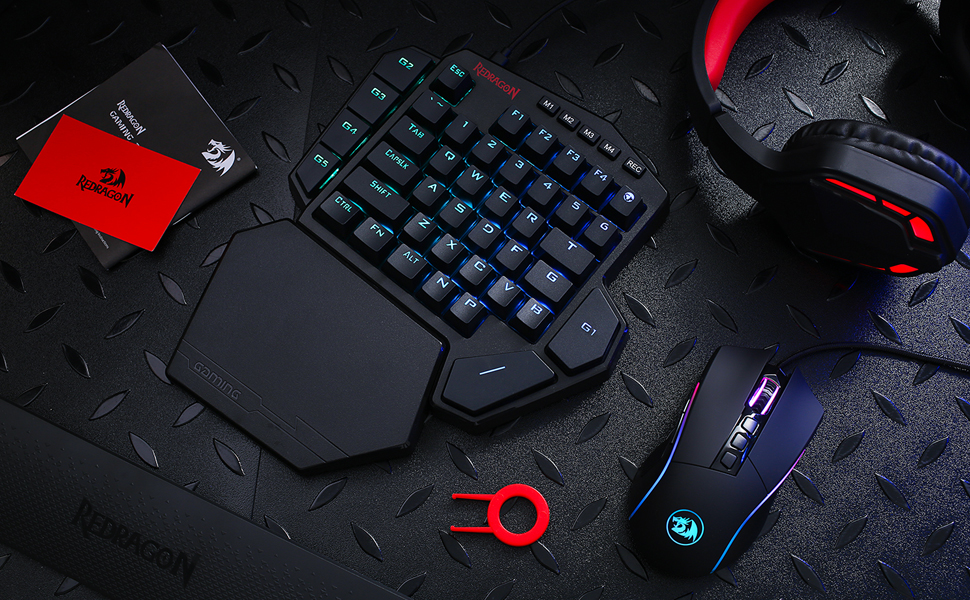
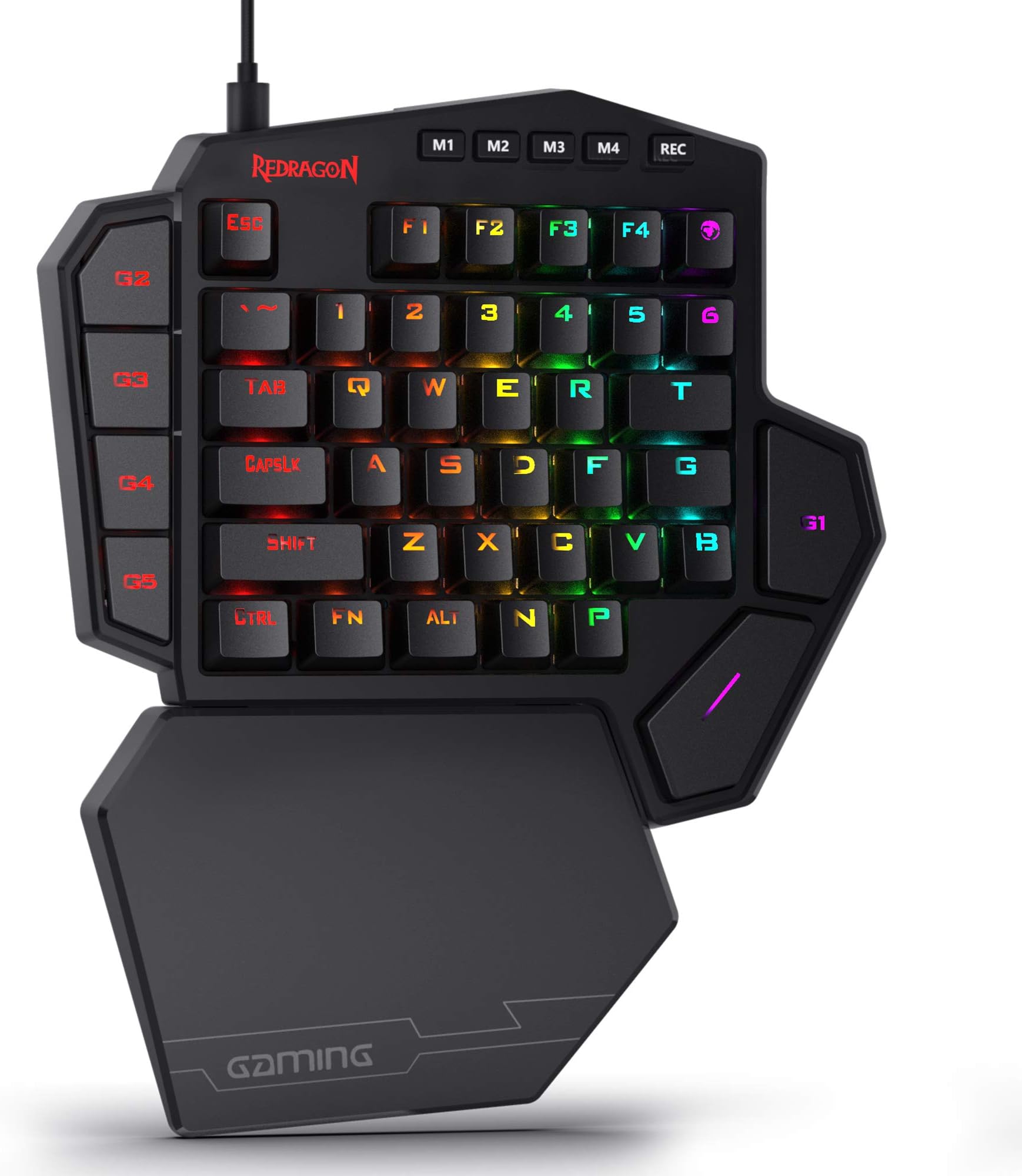
The Redragon K585 is a wired, one-handed mechanical gaming keypad featuring a tactical 42-key layout, 7 onboard macro keys supporting 28 combos across 4 profiles, and hot-swappable switch sockets compatible with most 3-pin and 5-pin switches. It includes a USB pass-through port, detachable magnetic wrist rest, and customizable RGB lighting with 16.8 million colors and 5 modes, all designed to elevate your gaming efficiency and desk aesthetics.


| ASIN | B07NBJVH4G |
| Additional Features | 42 Keys One-Handed, Compact For Gaming, Extra Onboard G Keys, Wrist Rest |
| Antenna Location | Gaming |
| Best Sellers Rank | #662 in Video Games ( See Top 100 in Video Games ) #68 in PC Gaming Keyboards |
| Brand | Redragon |
| Built-In Media | Keycap/Switch Puller, Spare Switches, USB Cable |
| Button Quantity | 5 |
| Color | Black K585 |
| Compatible Devices | Laptop |
| Compatible Operating System Family | Android, Linux, Windows |
| Compatible Tablet Computer Models | AAUB P30 |
| Connectivity Technology | USB-C |
| Customer Reviews | 4.4 out of 5 stars 7,488 Reviews |
| Enclosure Material | Acrylonitrile Butadiene Styrene |
| Hand Orientation | Ambidextrous |
| Item Dimensions L x W x H | 10.3"L x 8.5"W x 2"H |
| Item Highlight | On Board 28 Combo Slots 4 Profiles Keyboard, USB Pass-Through Port, 16.8M Colors, Swap-Ready Socket, Detachable Wrist Rest |
| Item Type Name | gaming keyboard |
| Item Weight | 1.3 pounds |
| Keyboard Backlighting Color Support | RGB |
| Keyboard Description | Mechanical, Gaming, Macro |
| Keyboard Layout | QWERTY |
| Manufacturer | Redragon |
| Mechanical Keyboard Switch Model | Blue |
| Mfr Part Number | 711210126 |
| Minimum Required Operating System Version | Android 13.0 |
| Model Name | DITI |
| Model Number | K585 WIRED |
| Number of Items | 1 |
| Number of Keys | 42 |
| Number of Packs | 1 |
| Number of Sections | 5 |
| Power Source | Rechargeable Battery |
| Recommended Uses For Product | Gaming |
| Series Number | 585 |
| Special Feature | 42 Keys One-Handed, Compact For Gaming, Extra Onboard G Keys, Wrist Rest |
| Style Name | Gaming |
| Switch Type | Clicky |
| Theme | Gaming |
| Unit Count | 1 Count |
| Warranty Description | 1 year |
P**G
Best Gaming Keyboard I have used & at a Great Price!
This product by Red Dragon is amazing!! I had an expensive Corsair "gaming keyboard" for the past 2+ years, but what is gaming about a standard keyboard? just the lights? This is why I wanted to try out this Red Dragon one handed gaming keyboard and I am glad I did. This thing fits your hand perfectly, your wrist is supported by the extension on the bottom area, the keys are spaced out so your hand is comfortable, spacebar is perfectly placed to rest your thumb on and it also has macros, a few other specializes(gaming shaped) keys like G, T as well. And if you like RGB, it has that too with many modes that you can control on the hardware or through software that is optional. So far, this feels so much better than any of the other keyboards I had over the past few years, it really feels like a gaming controller, not just a keyboard to type with. I combined this with a smaller tenkeyless keyboard now(that one is for typing) and I love this setup. The keyboard uses a blue switch setup, so the keys sound and feel very clicky, its nice for gaming. You can always change out the switches and keycaps too at any time and replace them with other ones, very customizable keyboard. I replaced the F keys as you can see in the attached image with white pudding keycaps for style. The price is great on this device, you can find it for $2X here on Amazon which is much cheaper than the "gaming keyboards" by bigger brands, yet this one is superior in all ways for gaming. I give it a HUGE thumbs up!!
M**D
Best single handed keyboard I've used, and I have used a lot of them.
I usually wait a while before reviewing, but this is getting a same day review baby. The build quality is top notch, but Red Dragon products usually are, even though they make budget products. We are getting F keys, 1-6 plus the normal alphas on most single handed keyboards plus a bonus N&P, and 5 macro keys. Outemu Blue switches (kaihl would be better but outemu is decent) outemu switches have box stabilizers around the stem to reduce key wobble. I would like to see an option for Red linear switches but at this price I might upgrade myself, if I can find outemu reds with the same pin size.. Not only is every key mechanical including the macros (gamesir z1 uses rubber dome for macros) but you can swap the switches out for outemus with the same pin layout. Switch and key puller is included plus a few extra blue switches. It has a magnetic wrist rest (thank you Red Dragon for giving me that option. Plus a detachable USB type c connector (when you have a keyboard, mouse, plus a single handed keyboard you will appreciate the ability to quickly disconnect and store when not in use) The RGB is actually bright and vibrant and the keys aren't super glossy with just enough texture to stand up to sweaty hands (long game sessions ya know?) The keys seem just a bit further spaced than I am used to, but this could be an illusion. It also features a USB pass through, although I haven't tested the latency so I'm not sure if it's viable for a gaming mouse. This thing is worth the money and then some. Unless you're going to shell out 150 for a Razer orbweaver Chroma (with less keys) and learn the button layout and map your keys in most games, this is the best option. I have purchased Gamesir Z1 single handed keyboard, 1byone single handed, Gamesir gk100 single handed, and the Logitech g13 (this was used for productivity due to it's sheer number of macros and key binding potential) I have been through all of those searching for the perfect one, and I believe I have found it. You won't regret it either. Edit: I tested the USB pass through and it has ZERO effect on the polling rate of my Logitech G502
R**1
Solid keyboard at a solid price. Just make sure you know what you need.
I'll be honest and say that I actually returned this item just because it didn't work for how I like to game. That being said, I was amazed at the quality of this product, despite the low price. The keys click very well and the backlighting is really good. I also love the detachable wrist pad. There's so many features on this thing that make it well worth the cost. The only reason why I returned it is because I was getting tired of having to reprogram the keys for almost every game I play. I bought this primarily so I could play ARC Raiders on my Steam Deck with the KB+M setup but not having "M" key to access my map grew tiresome and there's an odd space between the spacebar and other keys that I kept hitting whenever I'd try to jump. All that being said, my issues were purely my own and a lack of my research prior to purchase. It's a solid keyboard and I'll definitely be buying from Redragon in the future for their quality and price.
J**H
Super Comfortable, Easy to Use
While this seems to be larger than other popular keypads on the market, it is definitely comfortable. The included wrist wrest does a fine job of keeping my hand in a nice position and the spacebar placement is one of the biggest game changers in terms of comfort. Definitely better than using my normal keyboard at an angle. The build quality is as expected, plastic but sturdy. The keycaps themselves feel fine and the larger ones such as spacebar and macro keys don't have much of a wobble to them. I haven't spent much time using the macro recording feature so I can't comment on it but the 5 G keys along the side and above the spacebar work well. They are bound to F1-F5 by default which works fine for me as I didn't usually use those keys in-game as it is. G5 and G4 are easily accessible with my pinkie as they are near the shift key, so I tend to bind those to items I need quick access to or hud options such as opening a map or viewing my inventory. G3 and G2 are harder to reach but convenient enough to use as a mute toggle or similar interaction for comms or other programs running outside of the game itself. G1 requires some maneuvering but is convenient enough for binding a macro or lesser-used game bindings as it is still much more accessible than using the right side of a keyboard. The switches themselves feel adequate and match up to other blue style tactile switches I've used in the past. I tend to prefer linear switches but these do the job fine, though they are a bit loud. If you stream or plan to use this keyboard in situations where extra noise is an issue, go with the brown switch option. Overall this is a blast to use. The G keys combined with the extra keys already on my mouse give enough flexibility to stay in one position without reaching for out-of-the way keys elsewhere on my board. Solid product and definitely exceeded my expectations at the price.
H**Y
This is a great little keyboard for Division 2.
This replaced a wireless non mechanical keyboard I had been using and it's way better. The keys snap down very crisply and I have yet to have a keystroke miss. The LED light show behind it is pretty cool and good for some wow factor the first time you turn it on, but I do wish I could just tune it to one color and leave it be now. Mild gripe. I love that the palm rest is magnetic and snaps on and off easily, yet firmly stays on the keyboard. One issue I've found is that I've been putting in the hours on Division 2 since it launched and the weight of the keys is more than the old keyboard I was using. So now after about 3 hours of playing I can really feel it and the first couple days of playing I took breaks to let the back of my hand rest up. I figure that this will get better in time though with the keyboard breaking in and my hand getting used to it so I'm not to worried about it. I love that this keyboard has the M key as a little world map, nice tough, love that there is a USB pass through so that I'm only eating up one USB port between this and my mouse....I play on my couch about 15 feet away from my Nvidia Shield playing on the projector so this helps big time. I like the extra buttons that they give you, but honestly the G1-Gwhatever keys are just F1, F2, F3, etc. So they're kind of redundant, though placed way better on the keyboard to where you'll actually use the function keys now. Overall it's a great value. I don't feel like I bought the cheapest POS out there but didn't spend 100 dollars on a keyboard that I only use to play one game on. Cheers and hope this helps.
G**L
One of the best keyboard gamepads for the $$$
I'm a long time Belkin Nostromo N52 user and it finally started showing it's age last week with some keypress failures. After 15 years with it, it's as natural for me to use as a mouse. No thought required, just press the keys by memory. I've always used the same buttons for everything in the same position regardless of the FPS I was playing. Lethal's at TAB, Tactical at R, F use, etc. So my learning curve on this gaming keyboard was helped by that by just mapping everything in the same way. After playing on the N52 with the claw hand position due to the curved/raised wrist rest, I was a bit of an adjustment in hand placement. Didn't feel natural for about 4-5 days (maybe 10 hours in). Since then, It's becoming to require less thought and everything is becoming a reaction now without thought. The only part that's still odd is reaching for all the extra buttons that you can program having 41 vs. 20. I still have about 9 that I haven't programed. 1st world problems. The rest is comfortable and even though significantly different than what I've been used to for a long time, has become a positive. I've not had any issues with the space bar. Mt thumb lines up with it wonderfully and I'm 5'10" with average size hands. Software is easy to program and setup micros and adjust lighting. Wish it had a few more options for the lighting but its not bad. For the money, it's a solid piece of equipment that has worked as expected and I'm happy with. Doubtful it's going to give me 15 years of service like the Belkin N52 did but that's the new world we live in. Everything built to be disposable and replaced in a few years instead of making it the best they can and making it last a long time..
A**G
Good Hardware - funky software
Yet another misleading product. They claim you have 42 keys to program but there are some limitations. In other products claiming programmability that I own you are allowed to specify key combinations such as CTRL-SHIFT-C for any programmable key and only need to resort to "Macros" if you really want to issue a series of sequential key strokes like "CTRL-A followed by SHIFT-C followed by CTRL H" or "LEFT Arrow - LEFT Arrow - DOWN Arrow" but to the guys who designed this keypad a macro is any thing involving more than a single key - in other words if you want to have a key emit a capital H by pressing SHIFT H then that, to these guys, is a "Macro." So in order to substitute a different key for any key on the keyboard you first have to define a macro for the key sequence. While that is not rocket science it is tedious involving defining a "macro" by selecting macro mode, naming the macro, recording the key strokes, stopping the recording, and then applying the macro to the key. I recently bought a Penclic N3 keypad and every single key on that keypad could be programmed for any key combination from a simple one stroke like an 'a' or a "CTRL-SHIFT-F3" and also to program multiple keystroke "macros" for any key. Recording single keys consisted of selecting the key in their software and it put up a keyboard picture and you selected which keys you wanted to have that key emulate, like selecting "CTRL", "Shift", and "F3" on the keyboard picture which were then highlighted and clicking OK to record them. That capability makes this Redragon K585 look like a joke in comparison. The Redragon documentation on their website and here on Amazon claim only 7 keys can have macros applied, which are the 5 "G" keys plus a couple of others which are associated to the four different modes (M1 thru M4 on the top row) giving you 28 total alleged macros. Yet I was able to define macros for regular keys, not just the special G1-5 keys. So I'm not sure what they're talking about saying the Macros are limited to the G keys. Maybe it's that they only store 28 Macros - or they mean something different - that they'll take a single key macro sequence for any key but a multiple keystroke sequence can only be done on the G keys. In any case the documentation is worse than minimalist - the manual that comes with in the box is two pages, repeated several times in multiple languages. This keypad comes with no software in the box but is recognized in Windows 10 automatically as a "USB Device" with the attributes and icon of a keyboard. Which I suppose is fine if you're going to use it as a typical Left Hand action/shooter/RPG game KB, but if you want to program it you need software. And when you download the software from Redragon's website you get a package of 3 files, a PDF which tells you to run the included "Update_Firmware.exe" before you run the "Redragon K585RGB Keyboard-updated.exe" install program. The PDF file you get in the software package doesn't go into any real detail other than showing you what the update process looks like and what the customization software looks like. You get what you pay for and this is typical of the lower priced Chinese products. The Update program was really wonky, presenting a panel with a screwed up background of random black panels against a white background and two prominent buttons "start update" and "device message" - clicking on device message filled in data in 3 boxes giving you some kind of version data. Clicking start update caused it to take a few seconds to do some kind of firmware update and two progress messages appeared in a white panel below the buttons. After doing that, following the instructions in the PDF, I was able to run the main software which, for some reason needs to put up a white square in the upper left corner of my screen blocking out some of the desktop icons I use frequently and then putting up a panel in the center of my display with a picture of the keypad and giving you the ability to set the RGB light patterns and to program the keys for the functions you need. The keypad feels solid enough with good key action. And other than the convoluted "macro" programming and the strange update program this keypad will probably fit my needs. After I've used it for a few weeks I'll report on whether it was worth the time and trouble!!!
L**E
Good quality
Works great, I love the fact that the wrist part is removable. So far so good, it has been constantly working and stable and the colors are nice. I wish you can keep it just on one color but at least you could slow it down so you don't notice it as much as I found it distracting.
H**T
I mean... It's half a Keyboard! so yeah...
I can see this being handy for a gamer who uses a laptop. I have a full PC setup, keyboard, mouse, everything! so here's why I decided to purchase half a keyboard: The 'W' key on my Blackwidow Chroma (had it since 2016) has started to play up, when I hold it down it doesn't continuously register that I'm holding it down and as a gamer, I use the 'W' key constantly to walk forward so my characters keep walking and stopping and walking and stopping. I figured the rest of my keyboard is working just fine so why go purchase a brand new one if it's just one key playing up? Red dragon was the answer. Pros: It has 'just enough' buttons to use for gaming, You can install a program to change the lights, I prefer the pass-without-a-trace setting (only lights up when I press a key), and there are a few different settings to play with but don't expect to pay this much and have as many features as a razer device when it comes to RGB lighting. The price is right. It's ergonomic, I have had no wrist issues and the wrist rest is detachable also if you prefer not to use it. It's plug and play, plug it into a USB port and you are ready to go. The REC button is handy and there are other buttons available to set up macros, especially handy for MMORPGs. It has non-slip padding on the bottom. Having the 'Enter' key (G1 key) right there is super handy. The buttons are positioned in a way that makes them easy to reach during gameplay. Cons: you may need to re-bind some buttons such as the 'I' and the 'M' keys if you are playing a game that uses an inventory or map feature. Most newer games are using TAB for those features. The space bar takes a bit to get used to. There were complaints about having small hands in other reviews - I have tiny hands and I have no issues using this keypad. So if you absolutely have a use for a one-handed keyboard I highly recommend the Red Dragon. Obviously, it won't be as handy as a full-sized keyboard with all the keys present. But for what I need it for it is perfect. For FPS gamers it's perfect!
A**Y
Fantastic in general, really good for the price
So, I'm coming from a Razer Tartarus V2, and I prefer this keypad so much more. Maybe because it works more like a keyboard, so you don't have to build up muscle memory as much. In terms of build quality, it's a bit light, but as it still uses mechanical switches, and it has extra switches that you can replace, I have no problems with it. The only issue I found is that white light isn't actually white, but light pink. I'm okay with that, but if you want white, you won't be able to get it here. In terms of ergonomics, the wrist rest is good, sometimes I wish it was made of a softer material, but in the end I think plastic is better because any soft materials are just going to make my wrist sweaty. The other thing I hear a lot in the reviews is that the space key is too far out, which I personally did not find at all, as I always have my thumb a little extended, as seen in the picture. Finally, the software for customizing macros is good, it lets you set different profiles, allowing you to set macros to every key, and allowing for different lighting options. The lighting options are definitely a little limited though, and I couldn't actually find a setting that would give me a solid color (not an swirling or wave effect) that wasn't red. Overall, very solid purchase, still not sure how long it's going to last as I just bought it, but hopefully it lasts a while. If it does break, I will probably buy another one.
F**P
Nicht nur gut für Gaming sondern auch fürs Arbeiten Top!
Diese Einhandtastatur ist nicht "nur" für Gaming zu gebrauchen. Ich habe mich für diese Tastatur entschieden da ich beim Arbeiten gerne Macros verwenden wollte um dedizierte Tasten für verschiedene Befehle zu haben. So kann man z.B. beim Videoschnitt funktionen wie Abspielrichtung, Compressor oder im Prinzip alles was man per Tastenanschläge realisieren kann. Die Möglichkeiten sind daher nahezu endlos. Auch könnte ich mir vorstellen das man als Streamer diese Tastatur gut und gerne verwenden könnte um seinen stream zu steuern. So könnte man in OBS seine Sczenen per Tastendruck wechseln. Und wenn man Fertig mit arbeiten ist - einfach das Profil wechseln und rumballern. Aber mehr zum einzelnen Hardware positiv: -Blaue Taster und sogar ein paar Ersatztaster falls es Probleme geben sollte. Diese sind besonders beliebt bei PC Spielern und geben einem einfach mit das beste Feedback wenn man die Taste gedrückt hat. -Gute Keycaps, keine Folierten dinger wo das nach kurzer benutzen abgeht. -Sauberer gut lesbarer Font mit guter RGB beleuchtung -Starke Magneten um die Handauflage zu befestigen. -gutes gesleevtes Kabel -eingebauter USB 2.0 Hub (1 Anschluss für z.B. Maus) -Macros werden im Gerät selbst im Speicher gehalten nicht auf dem PC -Hochwertiges stabiles Plastik insgesamt guter Eindruck -Profil-Tasten um schnell umzuschalten (z.B. Photoshop macros auf M2 -> umgeschaltet auf M1 zu Fortnite oder sowas) -Alle Tasten können mit Macros belegt werden (außer Profil/Rec tasten) negativ: -etwas groß -Fragwürdige Tastenverschiebung - die P Taste ist unten rechts wo M sein müsste und das M ist die Taste ganz oben rechts. kein wirkliches problem - kann man in der software sehr leicht ändern da alle Tasten Makro-fähig sind Außerdem wurde das M mit einem Globus-symbol versehen (Map)... kann man mögen aber ich weiß nicht wieso -wenn man wirklich meckern will könnte man sich noch wünschen das weniger Plastic sondern vielleicht Alu verwendet wird, aber wirklich auch nur wenn man meckern will -keine haptische(gefühlte) Unterscheidung der Tasten. Es ist üblich das die F Taste einen kleinen Hubbel hat um auch ohne hinzusehen seine Position auf der Tastatur wieder zu finden. der Fehlt hier leider. Man hätte ihn hier auch auf die WASD Tasten legen können da hier der Fokus nicht auf schreiben sondern auf Gaming liegt. Man kann sich also auf der Tastatur im schlimmsten Falle mal kurz "verlaufen". Ich denke das ist Eingewöhnungszeit. Software positiv: -klein und leicht bedienbar -keine werbung oder ähnliches -nicht schwer zu verstehen und schnelle übersicht. -einstellbare USB Report Rate -auch ohne software nutzbar negativ: -Standard ist 50ms verzögerung bei jedem Tastendruck, und das verdoppelt sich auf 100ms je Taste jede Taste runter wie rauf registriert wird. Daher ergibt sich dann natürlich 100ms. das ist selbst dann ein wenig langsam wenn man "Hello World" eintippt. Meine Empfehlung ist bei Taste runter 10ms und die Taste hoch auf 0ms(leider geht nicht 5ms die Verzögerungszeiten sind in 10ms schritten aufgebaut). Der Befehl wird dann Problemlos sequenziell abgearbeitet. Es lohnt sich also ein Wenig finetuning zu betreiben. -leider kann man nicht mehrere Einträge gleichzeitig im macro bearbeiten, so dass es bei langen Befehlsketten schon eine weile dauern kann bis man das Perfekt eingestellt hat -kein macro an/aus toggle (wäre schön wenn man ein sich wiederholendes Macro schreiben könnte das so lange läuft bis man die Taste erneut drückt) hier sind Zyklen eingebaut. d.h. man kann z.B. ein Macro 10mal wiederholen lassen bevor man es erneut startet. Das kann man mit diverser Software ergänzen - z.B. X-Mouse Button Control oder beliebige andere Auto-klicker Als letzter positiven Punkt möchte ich den Support nennen. Dieser ist sehr nett und hilfbereit. Wie ich bei anderen Produkten dieser Firma festgestellt habe - sehr verlässlich - sehr gut. Insgesamt eine sehr gute Anschaffung. Ich habe es als geschenk bekommen und bin begeistert. Wer also nicht eine zweite Tastatur an seinem Arbeitsplatz haben möchte und dann mit Autohotkey und anderen Wundermittel versucht sich mehr Möglichkeiten zu geben (siehe Linus Tech tips) - der kann sich diese Tastatur holen und hat sich viel Bastelarbeit gespart. Und natürlich ist gaming hier im Fokus - das schafft sie auch problemlos. Der Preis und die Ausführung sind sehr gut. Die Hardware ist ebenfalls sehr gut. Es bleibt wenig zu Meckern, die Bedienung zu erleichtern (Multi-select) wäre z.B. ein Punkt und auch ein An/Aus toggle für Macros. Es bleibt ein sehr gutes Produkt und ich denke es hat 5 Sterne für diesen Preis verdient.
H**D
رائعة
ممتازة واستجابتها سريعة وصوتها كويس وكمان الممتاز جدا فيها امكانية تعديل الزرائر الإضافية دا غير إن ليها سوفتوير بينزل من الموقع الرسمي بيعدل فيها كل حاجة وممكن يتم تسجيل أكتر من ماكرو
A**A
Too big, but it's amazing
Things that I like 1. Crisp keypress. 2. Anti-ghosting is quite good, haven't had any issues with multiple keypresses so far. 3. It is comfortable to use, specially because of the key layout. The things that I dislike 1. My hands are huge and I still can't reach some keys at times, so the keypad is perhaps a bit too big, it should come in various sizes so people with smaller hands can use it as well. 2. There is no software to program the macros, macros are programmed physically on the hardware, that is severely disappointing, usually softwares allow you to set macros based on microsecond delays and are highly editable. 3. There is no "Enter" key on the keypad. The key over the space at could easily have been used for it. 4. The "M" or the map key is way off its place, it's at the top instead of it's usual location, so I just reassign the keybind for map to "B" instead. I would say, in this price range, it is one of the best you can get :D
Trustpilot
1 month ago
1 week ago