Desertcart purchases this item on your behalf and handles shipping, customs, and support to Senegal.
๐ฅ Stay cozy, save smart โ control comfort like a pro! ๐ฒ
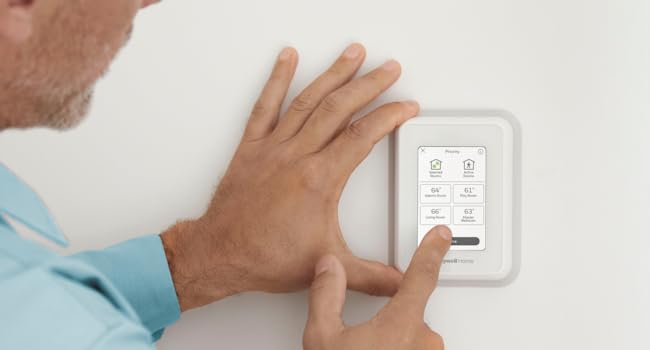
The Honeywell Home T9 WiFi Smart Thermostat with Smart Room Sensor offers advanced multi-room temperature control via remote sensors with up to 200 ft range. Compatible with major HVAC systems and voice assistants, it features Energy Star certification and smart scheduling to optimize energy use. Easy DIY installation and a customizable touchscreen make it a top-tier choice for modern homes seeking comfort, convenience, and savings.


| ASIN | B07N849J21 |
| Additional Features | Built-In Speaker |
| Best Sellers Rank | #33,375 in Tools & Home Improvement ( See Top 100 in Tools & Home Improvement ) #39 in Home Programmable Thermostats |
| Brand | Honeywell Home |
| Brand Name | Honeywell Home |
| Color | White |
| Connectivity Protocol | Wi-Fi |
| Connectivity Technology | Wi-Fi |
| Control Method | Voice |
| Control Type | Touch |
| Controller Type | Amazon Alexa, Google Assistant, SmartThings, Vera |
| Customer Reviews | 4.3 out of 5 stars 2,987 Reviews |
| Display Type | LCD |
| Finish Types | Glossy |
| Global Trade Identification Number | 00085267723534 |
| Included Components | Thermostat, Mounting Hardware, Sensor |
| Item Dimensions D x W x H | 0.94"D x 3.7"W x 4.92"H |
| Item Type Name | WiFi Thermostat with 1 Smart Room Sensor, Touchscreen Display, Alexa and Google Assist |
| Item Weight | 1.3 pounds |
| Manufacturer | Honeywell Home |
| Manufacturer Part Number | RCHT9610WFSW2003 |
| Manufacturer Warranty Description | 2 year limited warranty. |
| Material Type | Plastic |
| Model Name | RCHT9610WFSW2003 T9 |
| Model Number | RCHT9610WFSW2003 T9 |
| Mounting Type | Wall Mount |
| Number of Batteries | 2 AAA batteries required. (included) |
| Number of Items | 1 |
| Number of Packs | 1 |
| Power Source | Corded Electric |
| Product Dimensions | 0.94"D x 3.7"W x 4.92"H |
| Product Style | A. Wi-Fi Thermostat w/Sensor |
| Shape | Rectangular |
| Special Feature | Built-In Speaker |
| Specific Uses For Product | Furnace |
| Specification Met | Energy Star |
| Temperature Control Type | Heating and Cooling |
| UPC | 085267723534 |
| Unit Count | 1 Count |
| Voltage | 240 volts |
D**Z
Super easy install, works great!
(this review is long but detailed - hope it helps someone) I hesitate to review this thermostat too soon, as I bought a Honeywell RTH9585WF1004 ($200) 14 months ago, gave it a good review, then 13 months later it completely lost any accuracy of the actual temperature - and why I now have the T9. I also hesitated to continue with Honeywell, as the past 2 wi-fi thermostats from Honeywell were horrible (TH9320WF, returned within one month, and the RTH9585, worked for 13 months) - but I didn't like the other brands available. The T9 is brand new, and the remote sensors sounded awesome for my house - 2 story, 1 AC unit, terrible air circulation, temp varies between floors/rooms. INSTALL: I removed the inaccurate Honeywell RTH9585, and installed the T9 according to the very basic install instructions. I had one issue with installation which was my own fault - set the wrong type of HVAC unit in Setup, so the AC wouldn't turn on - then I caught my mistake. I'm still not entirely sure I have the correct type selected, as the T9 indicates my heat pump is 2-stage and I don't believe it is...I'll find out in Nov when I need heat in Arizona. SMART ROOM SENSORS: Bought a total of 4 Smart Room Sensors, 2 for upstairs (one in M Bed) and 2 for down. After installing the Base unit, went to Settings and simply followed the unit's displayed procedure for installing/naming the Smart Room Sensors (place one sensor, return to the Base, name it, then go on to the next sensor). SCHEDULING: This section was really easy setting up a "5+2" day schedule which allows for multiple Away/Stay cycles (vs the usual 2 On/Off, On/Off cycles on previous thermostats). It was also really easy choosing which Sensors to use in the programming. Example: WAKE time, I'm in the Loft on the computer, so that's the Sensor that the Temperature is based on. AWAY time is mid afternoon (Peak Pricing) so the temp is set higher. HOME is at evening (when Peak Pricing ends), I'm always downstairs in the Kitchen or Family Room, so the Temperature is based on those 2 Sensors, SLEEP at night the Temperature is based on the Sensor in the M Bed. More cycles can be added - I'm not sure if they can be named differently. I have the sensors set for times, but they can be used as motion detectors to detect Activity, making them active. If multiple sensors (that you selected) detect activity, the temperature is based on the average of the Active sensors. I don't know what happens if a sensor senses brief activity (like grabbing something from the kitchen then leaving that room, example) or what happens once one goes to bed, thus there is NO activity. For me, using set times is better. Geofencing is also an option but not one I need/use. It detects (via your cellphone) when you're in/out of range and adjusts the temp based on that. (how it works with a family, I don't know) I'm honestly not gone for more than several hours at a time, plus I have a zoo so can't let the house get too warm/cold. HONEYWELL HOME APP (Android): After a week using the Schedule I'd set, it needed a bit of tweaking with some temp changes and changes in renaming/moving a Sensor. I had already installed the Honeywell Home App on my phone but hadn't really messed with it - so I did my "tweaking" of the T9 programming through the App, not the Base unit. It was a bit confusing at first (it's not super intuitive) but, once I got the layout of the App, I was able to make temp changes, move a Sensor, rename a Sensor, adjust some minor details. Using the App (once I got the hang of it) was easier to program the T9 than using the Base unit - I was able to do it sitting down in another room vs standing, hunched over at the Base unit. The App can't be used for the Initial Setup of the Base unit, obviously. CONS: 1) Wi-Fi is supposed to be 2.4Gh or 5Gh. I tried to set the Base to my 5Gh signal...it found the signal but would not connect to it - I got an error message and told to contact Honeywell Support. I didn't want to mess with that (I've read it needs a Firmware update - I just haven't checked if that's true) so it's set to the 2.4Gh signal. Honestly, don't know what diff it makes, why would a thermostat need a faster signal? Only reason I can think of is that my phone is set to the 5Gh and the T9 to 2.4Gh - BUT I was still able to reprogram the Base using the App, so I don't know. 2) The instruction manual is very basic; it gives very brief install instructions, the pictures of the wiring could be a little bigger/clearer. There are no instructions for installing/setting up the Sensors (the Sensor box has a very brief install/program/pairing instruction). That's all described (fairly well) on the Base units display. 3) The Honeywell site has no more instructions than what's in the box. There are some VERY short (~2min) videos on how-to for a few basic things but I didn't watch them. An Online User/Help Forum would be a great addition, I'm sure most people have the same basic questions and some need more detailed instructions - forums are super helpful. It's possible they do have a Forum somewhere but I didn't see one or a link. 4) Alexa is supposed to work with the T9...and it does (once you add the Skill through Alexa - make sure to remove the app/skill for older thermostats) but it's rather confusing. The Alexa App did a search for new items and it found the T9 Base, as well as the 4 Sensors. I can use really basic commands BUT you have to use the name you gave to the Base and/or Sensors...I said, "Alexa, raise the temperature 1 degree" and it replied, "I found multiple items...". I haven't explored it enough to know whether I can say, "Raise the temperature of Kitchen 1 degree" or so on for the other Sensors - and again, Honeywell has NO online instructions for using Alexa or other voice apps. On the other hand, for now I have the programming/scheduling JUST right for all rooms and various times of day, so I've not needed to change it since my tweak. 5) The price is a bit high. Over $300 for the T9 and 4 Sensors (especially since I spent $200 last year for the previous Honeywell unit). So far, having the house a LOT more comfortable and NOT having to be changing the thermostat setting throughout the day, it seems to be worth the money. 6) The sensors are applied using double-sided tape. This is both a pro and a con. Even after cleaning the wall where one sensor was going, the sensor fell off the wall 5' to the tile floor. The tape is nice for not having to use screws and in that I decided to move one of the sensors, but I'd feel better using a screw. PROS: 1) It's only been 2 weeks, but the T9 is working great and it's nice having various rooms of the house at slightly different temps at different times. 2) Easy installation. For my HVAC unit (12 yo heat pump) the wiring was simple enough and I already have the C-wire. The T9 does come with an adapter for homes without a C-wire, I don't know how easy it is to use. 3) The Setup was actually very easy to use (aside from the 5Gh Wi-Fi not working). 4) The Honeywell Home App is also easy to use, once one understands the interface. 5) Multiple Home/Away cycles. I'm generally home all day so I don't need more than the usual 2 On/Off, On/Off cycles but I'm sure the additional cycles are convenient for some households. Final thoughts: I've read several other reviews complaining of needed firmware update and a hassle of needing to use 2 Wi-Fi phones to do the update. I couldn't get the 5Gh to function, but the 2.4Gh works just fine. I guess some people have their Wi-Fi set up so there aren't 2 separate signals? I'm not sure - but I might find out someday if I ever decide I really want the 5Gh signal. I've also read people complaining about the App not working. I've had no issue at all with the app. Also, I've seen people state that if the power goes out, the entire T9 configuration and schedule is lost. I haven't had power issues, I just hope that's not the case. One would think that the settings are saved either at Honeywell Cloud or on the phone, if not the unit itself (though it doesn't use batteries). I hated the previous Honeywell Wi-Fi thermostat, but it never lost it's programming so I can't comment. In my experience so far, even though the included instructions were very basic, the setup for the T9 was straightforward and easy to comprehend using the Base unit's displayed instructions. I only hope that I didn't spend $300+ on a Honeywell Thermostat that will only last 13 months, as my last $200 unit did. So far, I love it.
P**N
You need this because you don't sleep in the hallway. But there is a minor issue.
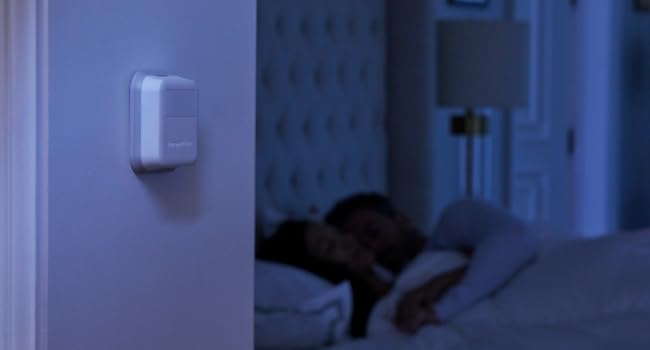
This Honeywell T9 and some competing thermostats support remote temperature sensors that you can place in bedrooms or anywhere you want. That way, you can keep the rooms that matter the temperature you want, never mind the temperature where the thermostat is, which is usually in a hallway. That is a big deal for me and perhaps for you. With bedroom doors closed, the temperature in the bedrooms can be very different from the temperature in the hallway. Any thermostat without remote sensors maintains the temperature at the thermostat, i.e., in the hallway, while the bedrooms get too hot or too cold. And, unlike the other fancy thermostats, you don't need an app to use it. You can use an app if you want to. I like this T9 a lot better than the Ecobee and Nest thermostats. The Nest tries to outsmart you, which is very annoying. It's too much trouble to get it to do what you really want. I had an Ecobee for a while. It's better than the Nest, as it's easier to set it the way you want, but it has problems and eventually it had to go. You have to use the app to control some functions. It had some very annoying features and attributes, including not be compatible with very common Bryant furnaces if you like to leave the fan running all the time. And then it went haywire and died. That is, it looked like it was working but the furnace would not work due to a failure of the Ecobee. The Honeywell is better, in my view, because: - It comes with written directions and you can set it up with them, without needing to install an app. - It looks nice and you might say plain, as opposed to other advanced thermostats that look kinda weird, depending on your point of view. - It is easy to install and set up - You can configure the display many different ways, including color, brightness, appearance at night, and how it looks when it goes idle after you stop pushing it. You can even make it go completely black when idle, which I like. Fortunately, unlike the Ecobee, it wakes up when you touch it, not when you simply walk past it. - You can have a very large number (20?) of remote sensors. I find I need 2. You might want more. - It does not have a problem when used with a Bryant furnace, as far as I know. What's the issue? After setting it up and not connecting an app, it changed the time by itself! I corrected the time, and it did it again. This repeated over and over. I figured out the problem on my own. There is no help for it at all in the user guide nor anywhere I can find online. I deduced that when it's connected to the Internet and there is no app connected to it, it resets its time to UTC, which is basically the time zone in England without daylight savings time. If you live in any other time zone, that's a problem. It would be impossible to set a schedule and have it work as you programmed it. The solution, which I found by experimenting, is simply to disable WiFi. You don't need to have WiFi enabled with this thing if you're not using an app with it. Without WiFi, it can't reset its internal clock to UTC, and all is well.
A**R
Great Thermostat, Easy Install especially with the Wall Plate Adapter
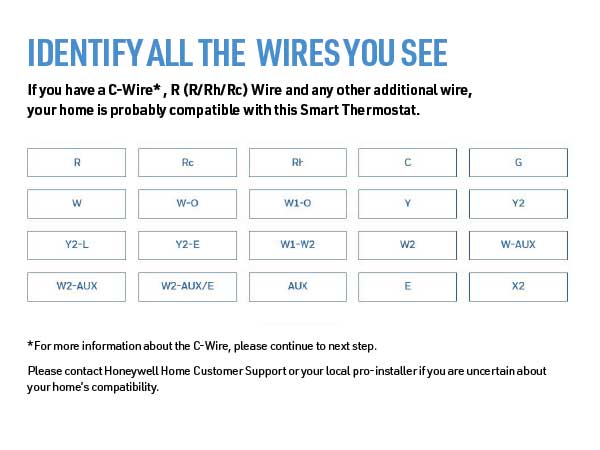
First the install is very easy if you are replacing an existing thermostat that has a C wire, a C wire adapter is included but I did not need that in my case. Secondly if you are replacing an existing thermostat, especially the traditional rectangular form factor, I HIGHLY RECOMMEND purchasing the THP2400A1080 wall plate adapter or the generic version which is much cheaper. It makes install of the T9 even easier. This thermostat has 3 holes you need to drill which are probably not in the location of the ones for your old thermostat. The wall adapter allows you to use the existing holes from your old thermostat then the UWP/mounting plate from the T9 (or any honeywell thermostat that uses the UWP) just clicks onto the adapter without new holes to drill. The cover plate from the wall adapter is then large enough to cover the area of your old thermostat. Now for a review of thermostat itself. My setup is a 2 story home with single stage forced air AC with a single stage gas furnace on a 2 zone system (upstairs and downstairs) so I bought 2 T9's that replaced 2 old smart thermostat (old honeywell with basic wifi and online scheduling capability). The old thermostats worked fine but I upgraded to the T9 to hopefully mitigate unbalanced temps between rooms on the same floor as well as between the 2 floors. It absolutely worked as I had hoped. It has only been a few days but I can immediately tell the difference in temperature balance between the rooms and the floors in over 100 degree weather. How are these thermostats helping balance the air temp? First the room sensors allow you to prioritize which rooms are being used for temp readings at different times of day or based on activity. This can be done by either specifying a single room (or group of rooms to average the temperature) or by activity (also individual room or averaging multiple rooms). During the day I can prioritize the living spaces and at night the bedrooms for temp readings. This combined with the auto recirculation mode of the fan allows the fan to recirc air about 20 minutes every hour even when the heating or cooling isn't actually running. Over the course of a day this really has helped balance the air between rooms and between the floors on my 2 zone system. Using the energy monitoring from my solar panel system I can already see a drop in energy usage as my AC has not had to run as much overall to make the occupied rooms comfortable. Also my thermostats are in stupid locations so the room sensors help with that. The UWP on the T9 is great as one of my thermostats is on the wall between the house and the garage which has a large hole for the thermostat wiring. The UWP for the T9 has a door that closes off that hole and the wiring before you attach the thermostat, so it is not reading any of that hot air coming from the wall. I confirmed this as my old thermostat use to read 2 degrees hotter than the rest of the hallway, verified with a separate thermometer, on a 100 degree day. The T9 now reads the same as the thermometer In terms of why I chose the T9 over a Ecobee or a Nest, basically the T9 generally is cheaper. The T9 thermostat with a room sensor can be had for as little as $143. The other popular options cost more. While the additional features of the others may be worth it to some I simply would not use those features. For example, I am not going to talk to my thermostat. I am just gonna set the schedules and let the thermostat do its think and it still has integration to those systems if I choose to have that functionality later. Overall, great value smart thermostat that does what it needs to do. If I had one complaint is that this thermostat, and Honeywell thermostats in general don't allow you to adjust the differential (the plus or minus above or below the setpoint the thermostat kicks on or off the air/heat) This seems to be set at a +/- of 1 degree and no way to change it. Some may prefer a differential of 1.5 to 2 degrees instead. This is somewhat mitigated by using multiple sensors to average the temperature but a differential setting adjustment would of made this thermostat almost perfect.
I**R
Honeywell T9 With Remote Sensor, Smart App, and Runtime Tracking
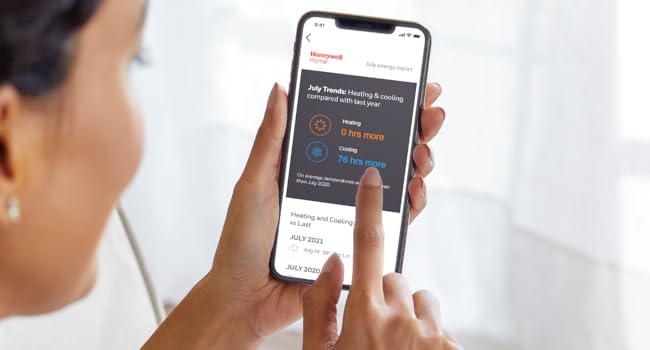
This product works fairly well, and has several features that I required. As a former control system engineer, this device is right up my alley. The features that I was looking for were: 1. Remote sensor integration. 2. Allows up to 6 schedule periods (Wake, Away, etc. You can rename the ones you add.). 3. Smart app usage. 4. Runtime tracking. The remote sensor works quite well. You can set up the schedule to use the selected sensor, average of several sensors, or use motion detection on the sensors. I have an application where the thermostat is located away from where we primarily sit, so I use the remote sensor only for all schedule time periods. I have used 6 schedule periods to conform to our normal occupancy of the area. I use the Honeywell Home Android app to control this. Once setup, the app is fairly responsive and effective. The thermostat is on an auxiliary HVAC system that is not as efficient as our primary unit, so I try to balance this unitโs use with the other more efficient unit, hence the need for runtime. I have two grievances with this item. One is that the runtime does not show in real-time. It is available the next day. I have had another thermostat (by Sensi) that would accumulate the time over the day, so you could do a better job of tracking. But this is somewhat minor. FYI the usage information is not available until approximately 48-72 hours after the unit is installed. The same was true for the Sensi, so I was not surprised. I contacted support to confirm, and they were very helpful. The second item that I am not happy with is more major in my application. You are not allowed to adjust the deadband around the setpoint for control. For my application, the unit cycles on and off very frequently. I think the deadband is only about 0.5 DegF. I certainly understand the comfort factor involved here, but my older furnace without a variable speed burner and/or blower is constantly cycling in the colder weather. Other systems allow adjustment of cycles per hour, of the deadband directly, or by using a fast/medium/slow setpoint response. I really wish this were adjustable, but I have not found that it is anywhere that I look. Overall, for modern, high efficiency HVAC units, I think that this unit will work very well. The T9 is one of the few thermostats that has the combination of remote sensor, usage tracking, and Smart App support. The remote sensor is a feature that is quite flexible and allows you to customize the usage of particular rooms at specific times of day. If you have a very specific schedule of activity in your house, where you are in specific areas away from your main thermostat, this can be very effective. I could see using it where you work from home, and prioritize the bedrooms, home office, and living room at different times of day. I have not used the motion sensor part of the remote, so I am not sure how that would work. Usage tracking is probably more for geeks like me, but it can be interesting. And I believe that the Smart App support (on its own not via Alexa) is important, and probably more common.
R**S
Full feature WIFI programable thermostat with remote sensing.
Excellent WIFI programable thermostat. Remote sensor optimizes the temperature when we are in the room (detects people in room and reads temperature. Easy installation with or without the included C-wire adapter (for those systems that do no include a C wire connection to the thermostat). I had a slight problem with the autodetect system function with my American standard HVAC unit but it was easily resolved in the manual system settings. Multiple WIFI aps to choose from (I am using the First Alert app for my phone. Easy to monitor usage, adjust schedule or implement an away / vacation override setting. Attractive small main unit with an easy to read, adjustable display (color, brightness, content). Good value for a full featured, reliable, thermostat.
T**S
2021 and this Thermostat while standalone works great, the App integrations are awful
It's February 2021 and I'm here writing a review of my Honeywell T9 Thermostat purchased in March of 2019. I have multiple echo devices in my home and a Smart Things Hub. For the first 14 or so months the Honeywell app integration directly with my Echo devices worked fine until one day it lost the ability to connect or see any of my thermostats or sensors. After a month or so of waiting for Honeywell to remedy the issue, I read many reviews with same problem as me, I decided to switch to using the Smart Things integration of the Thermostats directly. Setup was quick and easy, problem solved! ...or so I thought. After less than a year of working fine with Smart Things, my thermostats started indicating they were offline, I would have to go into the Smart Things app and remove both my thermostats and individual sensors, then completely re-add them as a solution and that seemed to work for a few months but now here we are where I haven't been able to get them to work for more than a month. As of Today when I connected the Honeywell skill to my Echo devices, it pairs without issue but no amount of discovery will ever yield the devices showing available to my Echo Smart Devices. They Smart Things app now gives me an error when I try to add the devices to my account with the app. Inside the Honeywell App I can see a section called "Connected Services" under Account where I can clearly see "Amazon Alexa" and "SmartThings" as connected services and there is no way to remove them. I've changed passwords, even clicked "DENY" when being prompted to connect Honeywell skills to either devices and it changes nothing. As a last resort, I've opted to call Resideo Technologies directly to see if they can remove these "Connected Services" and while waiting on hold I also opted to write this review. At the time of this review, I'm still on hold hoping for a solution....for more than 20 minutes now. While I continue holding for a solution, perhaps after submitting this review, I'm going to go check out something from NEST or others, suggest you do the same. PS. Don't even get me started on the Geofencing problems, just go read the app store reviews to get a glimpse of what I'm talking about.
L**S
Easy to install and configure
This thermostat has so many bonus features that can save money. These were easy to install for me, and took less than 10 minutes. There are videos that can help if you have questions, but I did most of my research before selecting the Honeywell T9. I purchased two - one for each unit, but installed both sensors onto the main unit. The free app is amazing, and you have options to attach to Alexa, Google, or neither. I easily added to Alexa, but really did not need to. I tested using my iPhone and asked Siri what the temperature is in the living room, and it works beautifully. I could also remotely turn the heat down when I was away. A feature that is saving me money in the first month, is to have the fan intermittently turn on at random times. I have tall ceilings, and have the ceiling fans on to circulate air, but allowing the blower to circulate air causes the heat & AC to run less. Where I live in NC, it has been <40 & 80+ degrees in the same day! Yes, you can set up the bottom (heat) and top (AC) temperatures to keep in the range, but adding an option to schedule the fan saved us energy. Another feature is that the temperature can be changed from the app, from in the home, or anywhere I have a cell signal. It can also be changed at the wall unit, which some other thermostats did not allow. At the next schedule change, it will go back to the scheduled temperature, or you can change the schedule permanently. This was very easy to set up, and the sensors are a bonus. So many homes have the thermostat in the hallway, or near a bathroom which is never the temperature of the living space. Having sensors that can be placed in office rooms, living areas, or craft rooms makes a huge difference. An additional bonus I didn't know I would need is the lighting on the unit can be adjusted to go dark at specific times. One of the thermostats is installed in the Master Bedroom, and it can be quite bright! It is set to turn off at a specific time in the evening and on in the morning. It can be set to stay on as a nightlight if you have one in a hallway. I really would recommend purchasing this, and will be purchasing as a house warming for a friend.
D**.
Seems like an excellent thermostat. Less excited about the app.
UPDATE- after using the app more, I've decided to upgrade my rating on the app to a B+. The connection issues haven't been a problem, and it is quite capable and easy to use regardless of how it felt during installation. I THINK that when I'm on the same wifi connection as the thermostat that the app doesn't have to "phone home" to get info and update settings, which is a bonus. Hardware still running like a champ, love it. -------------- The instructions seem pretty thorough. They cover multiple scenarios to make sure that you understand how to get it working. In my case, I had a four wire connection to the HVAC with no C-wire. The system includes an "adapter" that you connect to the HVAC panel, then re-connect your thermostat wire to it, and then finally connect the thermostat. This process gives you a C-wire at the thermostat so the unit has power. Better and prettier but more complicated than a dedicated wall-wart transformer. I've not tried the heater yet (it's August!) but the A/C side is working flawlessly. Installation took about 45 minutes to do everything but the wire pre-labeling, and it worked the first time. Controlling the unit from the panel is easy. Connected to the remote sensor fine. Can set the time and schedule, use motion detection to determine active room, everything it's supposed to do. Scheduling options are great. BTW, the main unit and the remote sensor report humidity too! All good. And then, I turned on the wifi. First thing it did was reset the time, I think to UTC. Then you have to download/install the app (ok), register a new account with Honeywell (ok), and create a location (e.g. "home." Possible to use the app to control multiple thermostats at different locations.) NOTE: If you don't let your phone or tablet use location data, you apparently can't create a location and the app just spins, but the app doesn't tell you that. Then connect the app to your thermostat. Honeywell emails your account an activation code that you then enter at the thermostat (somewhere around here it figured out my timezone and fixed the clock). Eventually it's all set up and your problems are over, right? Nope. I'll be poking through the app and at random times it'll claim I have no internet, but I'm sitting right next to my wifi and using internet on other devices. Having said all that, the app does function, controls the HVAC fine, lets me do what I need to do. It's not hard to understand or use, but the drops might be really annoying if they got in the way. I've not tried geofence and don't plan to, but that might be a good app test. Also the app is designed to work with a lot of devices. Thermostats, security systems, and more. Great on one hand but possibly causing loss of focus. So, overall: Hardware: A+ Instructions, ease of installation: A+ Honeywell App: C+ Most desired improvements: Fix the internet connection issue. Offer more options for programming, like "if there is a difference of <configurable> degrees between sensors, turn on the fan," or allow the system to run based on humidity/heat index.
J**I
Smart Thermostat upgrade
Super thermostat that has remote sensors for different rooms that allow priority temperature control.
S**D
Product voltage discrption is wrong
In the catalogue it is mention that thermostat will work only on 24 V
C**A
Excelente
Es bueno y fรกcil de usar, manejo todo desde la app en el celular
B**T
Not for normal domestic heating systems
This system only works with 24V control systems. IT is incompatible with live 240V controls as frequently used in the UK with timers for heating control. Otherwise it is a fine system, if only the sales info had been clear about it.
S**N
Works exactly as expected
Very happy with product, it works as expected and was easy to install.
Trustpilot
1 month ago
1 month ago