Buy anything from 5,000+ international stores. One checkout price. No surprise fees. Join 2M+ shoppers on Desertcart.
Desertcart purchases this item on your behalf and handles shipping, customs, and support to Senegal.
โ๏ธ Stay cool, stay ahead โ the silent champion your CPU deserves!
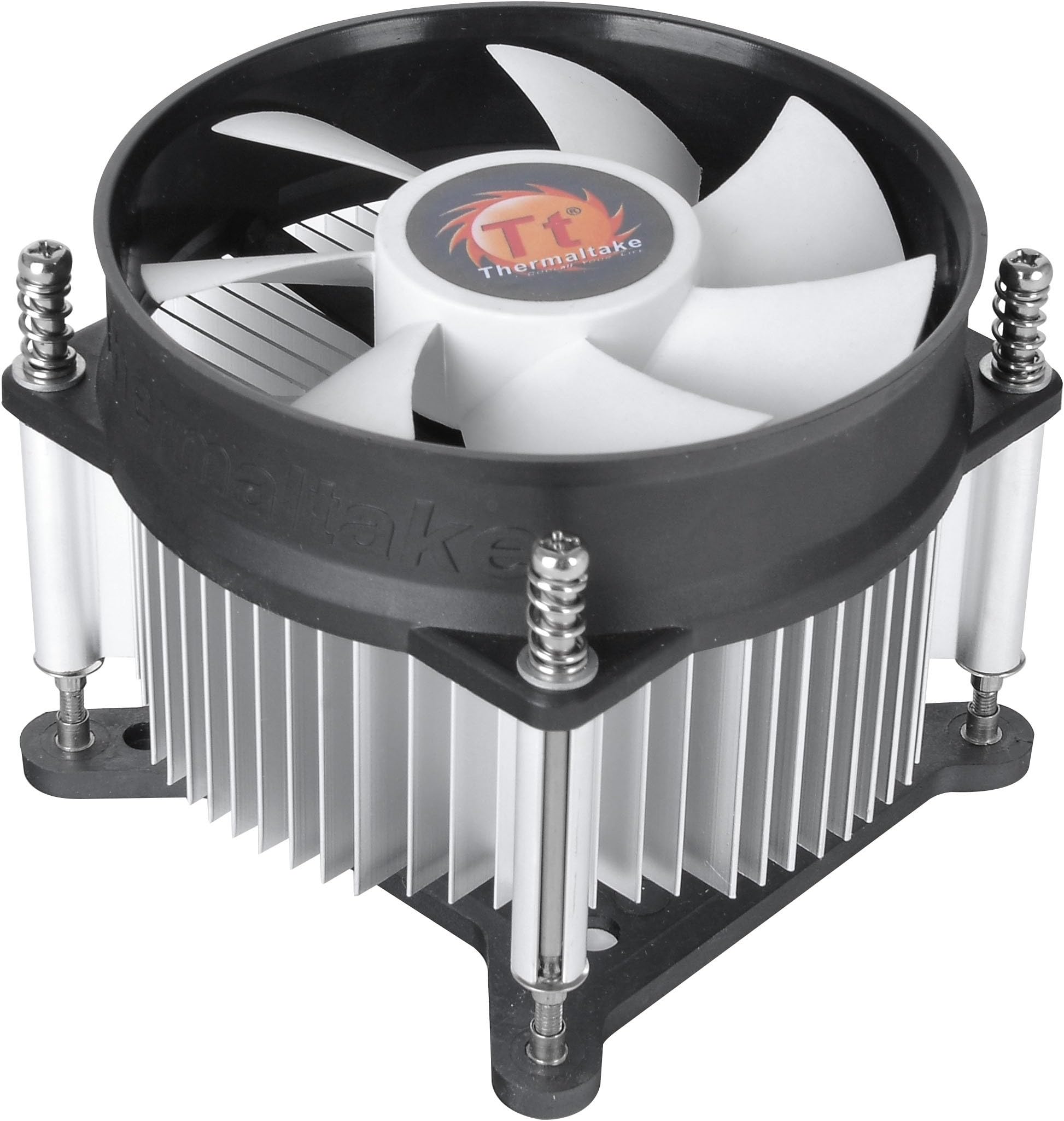
The Thermaltake Gravity i2 is a sleek, low-profile 92mm CPU cooler engineered for Intel LGA 1200/1156/1155/1150/1151 sockets. Delivering 31.34 CFM airflow at a whisper-quiet 21.3 dB noise level, it efficiently cools CPUs up to 95W TDP. Designed for easy installation and backed by a 2-year warranty, itโs the perfect upgrade for professionals seeking reliable, silent performance without the bulk or noise of traditional coolers.


| ASIN | B00O4UIZ86 |
| Air Flow Capacity | 31.34 Cubic Feet Per Minute |
| Best Sellers Rank | #49 in Computer CPU Cooling Fans |
| Brand | Thermaltake |
| Brand Name | Thermaltake |
| Compatible Devices | Desktop |
| Cooling Method | Fan |
| Customer Reviews | 4.6 out of 5 stars 2,384 Reviews |
| Global Trade Identification Number | 00841163056608 |
| Included Components | Air Cooler, Brackets, Screws, User Manual |
| Item Dimensions L x W x H | 4.25"L x 4"W x 4.25"H |
| Item Weight | 11.36 ounces |
| Manufacturer | Thermaltake |
| Material Type | Aluminum |
| Maximum Rotational Speed | 2500 RPM |
| Model | CLP0556-D |
| Noise Level | 21.3 Decibels |
| Number of Items | 1 |
| Part Number | CLP0556-D |
| Power Connector Type | 3-Pin |
| Product Dimensions | 4.25"L x 4"W x 4.25"H |
| UPC | 841163056608 |
| Unit Count | 1.0 Count |
| Voltage | 12 Volts |
| Warranty Description | 2 years |
| Wattage | 95 watts |
B**T
Great Cooler for the Money!
If you need a great, basic cooler for your Intel chip thatโs slightly better than the default cooler, look no further! Make sure you check to ensure your motherboard/processor are < 95W (so most of the relevant intel chips) and are one of the compatible sockets (again, most recent sockets) - once you do that, this CPU cooler is easy to install (install the backplate then screw in the 4 screws and plug in the fan header. Done. Couple of quick notes - first, this does use a backplate (unlike the push-pin based default included cooler) which means youโll need to access the back of your motherboard. Not an issue if youโre installing a new motherboard in a new case, but if youโre replacing an existing cooler in a complete build, you may have to remove the motherboard if you donโt have access to the back of the board in the case. I actually like this as the install is much more secure that the push pins - and you know you have the right tension - but it is something to be aware of. Second, this does have pre-applied thermal paste which makes it easy to use. The thermal paste seems to be of reasonable quality and is well applied - I used it as is for the initial install, but ended up moving the chip to new board and having to use my own. Expected and no issues - but if youโre looking for a bit more performance, you might want to think about changing the paste. If youโre running stock clocks and not running at max all the time, the included paste should be just fine. Third and final consideration - this is not a cooler for overclockers. It can probably handle a minimal overclock - but itโs really designed to be cool and reasonably quiet at stock settings, voltages and the like and it does well at that. With those considerations out of the way, if you have a compatible chip and donโt mind the above caveats, this is a great cooler and highly recommend!
M**O
This thing is amazing for the price and performance.
I've built about 80-100 computers in the last 30 years. I've used dozens of different air coolers over stock. With the exception of some high performance zalmans in Oc'd computers, I have to rate this as exceptional for the cost and performance of an air cooler. I mean I have put in $60-$80 air coolers for pretty typical computers that were only ok, heavy and loud. I did not over burden this cooler by overclocking. But seriously, $9, you wouldn't be looking here - but if your are in between - I'd buy it again with zero reservations. If you want even more quiet buy an adapter to reduce voltage for a couple dollars. I only bought this one because I bought a i9700k without a cooler and a Corsair H100i pro radiator cooler. The Corsair was not installing properly to the point I was ready to return it. I bought the Thermaltake cooler as a stop gap to get the computer running, loaded and then troubleshoot the Corsair. I think it took me only a few minutes from unboxing to booting. I was nervous and monitored temps in bios, they were in low 30's degC. I had the case open in my face and it was a bit louder (but not bad) than my silent case fans so I installed an adapter to drop voltage to 7V to lower noise while I was working on software. The temps never rose even with the reduced fan speed and now really quiet cooler. I can't say how impressed i am with a cooler that costs so little, is of high quality and is really pretty quiet. For me it was a stop gap until I go my Corsair water system running ( I did and well it's amazing but still) I'd never buy a stock intel cooler again. I did an i3 HTPC build not long ago and figured the stock would be good enough. Well, I'm pulling the stock cooler and replacing with this because I KNOW it will out perform it for the same sound level.
J**N
Quiet, Thermal paste pre-applied, Easy Install
Great heat sync and fan! I was thinking it was going to be noisy because itโs a 3-pin, but surprisingly itโs not! It came with thermal paste pre-applied (Great to know because I didnโt need any extra or to apply any at all). Installation took about 5-10 minutes, fits perfectly into the bracket. Solid price for the product, hoping it lasts until 2030.
V**.
Cheap, decent cooling, and it looks alright
I bought this for the cheapest stream PC out of old parts my siblings and I had laying around. Well it so happens to be the only thing we didn't have was a cooler with the appropriate bracketry for the LGA 1155 socket. So I resorted for for this unit! For under $15 it keeps an overclocked I7 3770K at 4.4ghz 1.2 volts under 95C in 29C/90F ambient temps on a 30 minute Cinebench R23 run. It does exactly everything we need but now the CPU is now too slow for the load we're throwing at it LOL! Not the coolers fault at all in that case and of course is the reason I threw a mild overclock at it. Now what I don't like is how it has a 3 pin fan connector. The ASRock P67 Extreme does not have a way to control DC powered fans. So the fans are on full blast in the case. Spins around 2200 RPM and isn't great to be next to. Thankfully in my case I am using Windows remote desktop and running headless so the PC can be on the common area. Keeps my room nice and quiet! The mounting bracket is kind of a pain in the arse but now that I think about it, if you have a case that has an opening on the back of the motherboard tray, you can try setting up a pillow or small box behind the pc and laying it down. I did it with the PC standing upwards which wasn't enjoyable. Nonetheless for the money, I am happy and the PC stays cool during 6 plus hour streams. PC Specs: ASRock P67 Extreme Intel i7 3770k 4.4Ghz @ 1.2v 16gb DDR3 @ 1600Mhz GTX 1060 6gb Fractal Meshify C mid-tower case
B**L
I recommend this one. Thermaltake hits another home run.
All I can say is once this is installed it will last forever. If you do not have threaded holes in your motherboard you'll have to remove your motherboard and install the circuit board nuts. You'll only have to do this once. This is a really well made CPU cooler and well worth the price. 1/23/2026 I have ordered a second one. This one is installed in a Dell Optiplex 7060 tower and fits perfectly. It is twice the size of the Dell cooler. I am well satisfied with the performance of these CPU coolers.
N**E
Good value and performance
Bought this as an upgrade for my travel PC since I just upgraded the CPU from i5-6402P to i7-6700K, and the i5 was previously cooled by a stock Intel passive cooler. Since the 6700K is rated for 95W TDP and the stock Intel cooler is only rated for 65W TDP, I went with this cooler as a fairly priced option that met my TDP requirement. I installed this yesterday and I'm seeing honestly really good temps for such a simple air cooler. On basically idle (Discord + Steam + MSI Afterburner open), I am averaging around 29-30C. I played approximately 3 straight hours of Battlefield 1 (very CPU-intensive game) on 1080P with all "Ultra" settings + DX12 disabled, and I never saw my CPU temperature reach above 65C. I think is great value and performance for a $13 air cooler operating almost at its rated TDP (91W CPU v. 95W cooler). Please note my temps are from an open air PC build and I removed the pre-applied thermal paste from the Thermaltake Gravity i2, which was replaced with Thermalright TF9 paste. *According to BIOS, the fan is spinning from 1980-2000 RPM. *There is pre-applied thermal paste
G**M
Good Fan very quiet (read the review for the mounting type)
Good fan, easy to install very quiet. Much beefier than the INTEL fan that stopped working ages ago. I wonder how I lasted this long without a working fan. Needed to open the case for something else and found the fan not spinning at rest or load. After installation the new fan shows up in the BIOS and the HWMonitor software shows the speed. This fan was a good replacement. Have not yet noticed my temps go down much but will monitor and post an update if something happens. FYI read the description, the mount on this fan is a threaded screw type (not the plastic click on type) and it comes with the bracket you can install underneath your MOBO if you need to install this fan. If taking your PC apart to install the bracket under the mobo is not for you, then move on to another Fan type. Hope this helps.
R**K
Actual height from contact plate to top of fan 2-3/8 inches
The good is that The cooler can work on a 65W processor, 3 pin connection so the fan always runs at a relatively low maximum speed. If you have a good stock fan, it looks like you could use it in place of the Thermaltake fan. The bad news is that the fin stacks are spaced very wide on the The Gravity i2 so even though the aluminum extrusion is slightly over twice as tall as the stock intel aluminum extrusion, I expect the surface area and mass is virtually the same so no, I don't see this being a 95W replacement unless you added a much more powerful fan which would mean more noise. On the plus side, it would take a long time for the Gravity i2 to get totally ineffective due to dust but that's pretty faint praise. Stock intel, roughly 5/8 inch thick extrusion, both curved fin and wishbone ends configuration to increase surface area in the same footprint. AMD Wraith Stealth, approx. 7/8 inch thick extrusion, straight fins, in tighter layout to increase surface area, more powerful fan and good to about 82W while being quiet and more wattage if you would put up with the noise of the higher fan speeds. Gravity i2, 1-5/16 inch thick extrusion, wide spaced fins so you only get 2 fins in the space where the comparison coolers would give 3 fins. I'm very disappointed with the Gravity i2, I was hoping for an upgrade and this isn't it. It could have been. Thermaltake could have made the extrusion 1-3/4 inch to 2 inches thick for a few more pennies and made it better than the comparison coolers and still not cannibalize their line of tower coolers. I recommend you get one of the small tower coolers with 2 to 3 copper heat pipes and a dense fin stack if you have room and an extra 3 dollars to spend. I think Antec makes one for about $15. That's if you even need a cooler at all. If your cooler is full of dust and your thermal paste is old, I recommend you blow out the cooler and replace the paste as your stock cooler probably compares favorably to the Gravity i2. If the Gravity i2 were actually 4 inches tall as the questions and answers would lead one to believe, it would have had the mass and surface area necessary to control a 95W to 100W load even with it's wide spaced fins.
K**.
Easy to install and cools well.
Easy to install and cools very well processors up to 95W. Pretty quiet as well.
F**.
El mejor por el precio
Tengo este disipador desde hace unas semanas montado en un i7-2600, las temperaturas comparadas con el de stock realmente no han mejorado mucho, siguen siendo las mismas cuando esta en reposo pero cuando le meto un poco de estres tarda mas en llegar a su punto mas caliente. Aqui el detalle por el que le doy las 5 estrellas es por la cuestion del sonido, el disipador de stock hacia mucho ruido cuando tenia una alta carga de trabajo y este thermaltake no hace absolutamente nada de ruido manteniendo la misma eficiencia, un punto a considerar si quieres tu setup lo mas silencioso posible, ademas de el costo (Que realmente es muy bueno) y ni hablar de los materiales y acabado, es elegante, bueno y eficiente, no le hace falta el rgb para verse bien. El unico pero que le puedes poner es que no es PWM, pero con los resultados que te da, no te importara mucho. Si tu procesador tiene un TDP menor a 95w, es una opcion que debes considerar, creo yo que es el mejor costo-beneficio.
ใ**ใ
็ดๆญฃใใใใใใใใฎใฏ้้ใใชใใ
็ดๆญฃใฎCPUๅทๅดใใกใณใไฝฟใฃใฆใใพใใใใ7ๅนด้ใกใณใใใณในใใฆใใชใใฃใใใใซใๆใใใชใตใผใใใผใใฃใผๆงใฎๆฌ่ฃฝๅใ่ณผๅ ฅใใพใใใไบคๆใฏใฝใฑใใใใณใใผใ้้ใใชใใใใซใปใฌใฏใใ็ฐกๅใซใงใใพใใใใใใใ็บ้ๆใซใคใใใใใ็ฎฑใฎๅทใๆฐใซใชใๅไปใซๅใๆใใฃใใจใใใงใใฝใฑใใใใณ4ๆฌใฎใใก1ๆฌใๆฒใใฃใฆใใใฎใงใใณใใงไฟฎๆญฃใใฆไฝฟใใพใใใๅทๅดๆง่ฝใฏใใกใณใฎ้ณใใใใใๅๅนๆใใใใใใงใใใ้้ใใชใ้ณใฏๅคงใใใชใฃใใฎใงใ็ดๆญฃใฎ้ณใฎๅคงใใใ็ฅใฃใฆใใๆนใใพใใฏ้ใใชใใกใณใๆฑใใฆใใๆนใซใฏใๅงใใงใใพใใใ
S**F
Good
Good.
E**S
Excelente compra
Excelente producto, edtoy satisfecho con la compra
Trustpilot
3 weeks ago
1 month ago