Buy anything from 5,000+ international stores. One checkout price. No surprise fees. Join 2M+ shoppers on Desertcart.
Desertcart purchases this item on your behalf and handles shipping, customs, and support to Senegal.
๐ Nano size, mega speedโconnect like a pro, anywhere!
The TP-LINK Nano Card Archer T2U Nano is a dual-band AC600 USB 2.0 WiFi adapter delivering flexible 2.4GHz/5GHz wireless connectivity with advanced WPA2 encryption. Its ultra-compact design and broad OS compatibility make it an ideal travel-ready networking solution for professionals seeking reliable, secure internet access on any PC or Mac.


| ASIN | B07KRCW6LZ |
| Best Sellers Rank | 169,513 in Computers & Accessories ( See Top 100 in Computers & Accessories ) 656 in Network Cards |
| Box Contents | Nano Wi-Fi USB Adapter |
| Brand Name | TP-Link |
| Color | black |
| Compatible Devices | Laptop |
| Compatible Operating System Family | Windows |
| Country of Origin | Netherlands |
| Customer Reviews | 4.4 4.4 out of 5 stars (18,536) |
| Data Link Protocol | USB |
| Data Transfer Rate | 633 Megabits Per Second |
| EU Spare Part Availability Duration | 1 Years |
| External Testing Certification | ANATEL: 13781903177 |
| Global Trade Identification Number | 06935364099978 |
| Hardware Interface | USB |
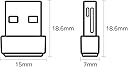
| Item Dimensions L x W x H | 16L x 7W x 19H millimetres |
| Item Type Name | TP-LINK Archer T2U Nano WLAN Adapter USB 2.0 600Mbit/s |
| Item Weight | 0.35 Ounces |
| Manufacturer | TP-Link |
| Manufacturer Part Number | Archer T2U Nano |
| Minimum Required Operating System Version | Windows 10 |
| Model Number | ARCHER T2U NANO |
| Unit Count | 1.0 count |
M**P
Great quality wifi
Got this for a laptop as it's so much faster than the internal WiFi. Was getting speeds of about 7 to 10mbs with the internal, now getting speeds of 350mbs, can be left in all the time as it hardly sticks out at all, and seems to be just as fast using the usb 2.0 as the 3.0, so it keeps the faster ports free. Works with both windows and Linux didn't need to install any other drivers, but found it better to disable old WiFi in Linux as it tried to use both and sometimes defaulted to old WiFi. Price was great, and the fact that it fits well and doesn't poke out is great.
H**D
Plug and Play
Works instantly without any set-up to give dual-band wifi on any non wi-fi equiped PC. Very compact and good connection speed.
D**H
Surprisingly effective - recommended despite initial problems
The dongle is for a second, non-networked desktop located away from my router. I plugged it into the rear of the desktop and the reception was poor and intermittent. On-line suggestions were for an extension cable mounted away from the floor and computer. I had a 2-metre one and it was successful. Reception is fine. It was easy to set up, once the cause of the problem was known. The dongle is cheap, and looks it, but it works fine now. It would have been five star had the cable not been required. Recommended with the caveat of budgeting for the extension cable.
G**E
AC600 Wi-Fi dongle. Fast, long-range, cockpit-ready. Built for rigs, streams, and mobile setups.
Type: Dual-band USB Wi-Fi dongle Bands: 2.4GHz (up to 200 Mbps) + 5GHz (up to 433 Mbps) Antenna: 5dBi high-gain, adjustable Interface: USB 2.0/3.0 Compatibility: Windows 11/10/8.1/8/7/XP, Mac OS X 10.9โ10.14 Use Case: Desktop rigs, mobile setups, site cabins, AV streaming, festival Wi-Fi boosts ๐ฅ Why It Deserves Big Compliments This dongle is a proper plug-and-play upgrade. The dual-band support lets you switch between 2.4GHz for range and 5GHz for speedโperfect for streaming, gaming, or remote work. The 5dBi high-gain antenna is the standout feature: it locks onto signals better than compact dongles and reduces dead zones, especially in larger rooms or site cabins 2 . Setup is cleanโWindows 10/11 auto-installs, and older systems can grab drivers from TP-Linkโs site. Itโs lightweight, portable, and ideal for rigs that need a fast, stable connection without internal Wi-Fi cards. โ Big Win Dual-band AC600 speedsโup to 433 Mbps on 5GHz High-gain antennaโbetter range and fewer dropouts Plug-and-play setupโno faff for most systems Compact and portableโeasy to stash or travel with Secure WPA/WPA2 encryptionโprotects your connection Amazonโs Choice badge + 40,000+ ratings โ ๏ธ Minor Trade-Offs Mac support limited to OS X 10.14 and below No Wi-Fi 6 supportโbest for casual use, not heavy-duty gaming Bulky with antenna attachedโmay block nearby USB ports Realtek chipset may cause rare disconnections on some systems No BluetoothโWi-Fi only ๐งโโ๏ธ Personal Verdict Used this in a site cabin and AV rigโheld signal, streamed clean, and stayed cool. For around ยฃ13, itโs a proper dongle that adds speed, reach, and cockpit-grade control to any desktop or mobile setup. If you want reliable Wi-Fi without the faff, this oneโs a winner.
M**N
TP Link Archer T2U Nano WiFi Dongle
Very happy with this TP Link Archer T2U nano WiFi Dongle which have put in USB at the back of my desktop computer following the loss of Internet following move of router re digital phone and worked once plugged in but did use the CD to set it up. The QR code did not work
A**Y
High quality basic WiFi adapter
A simple way to add a basic WiFi capability to older kit. Not the highest spec but suits my needs. Usual high quality and great value TP Link product.
T**Y
You NEED a USB extension cable for this to work properly!
Writing this after about an hour of trying to get this thing to run at some sort of acceptable standard, definitely not a "plug in and forget" type of hardware! So first off, I obviously tried just plugging it into my tower and seeing if that worked. It saw the wifi connection I wanted to connect to straight away, so that was good. Entered my password, got connected, it told me I had internet access but I definitely didn't as no websites would load. Tried switching the dongle into a different port, seemed to improve it a tiny bit, and by improve I mean it basically gave my PC the equivalent speed of a 28k modem! It was at the point where I wasn't sure if it was actually giving me internet or not since websites were loading so slowly. Then I figured to myself, "Well seemed like changing the port it was plugged in did have SOME sort of impact on the performance" and remembered I had an old 3m USB extension cable. I dug that out, routed it AWAY from my tower in almost a straight line, and suddenly went from about 0.3mb/s to about 25mb/s. Still not perfect, since my ipad gets about 50mb/s using it's wifi capabilities but this is at least something I can just about live with for a little while (I'm in a temporary living situation at my parent's house in between house moves so I just need a stop gap solution). So in conclusion, it quite likely will give you terrible performance if you try and plug it directly into your PC's tower, but if you have a spare USB extension cable, then the more distance you can get between the dongle and the tower, the better it seems to perform. EDIT: I've since decided this is worth 1 star at most - connection is probably the most unstable connection I've ever experienced! Longest I've gone without it cutting out is about 10 minutes. Then it just randomly disconnects and may reconnect straight away, or may take 20 minutes before it gets internet capabilities back. Using it's latest drivers, tried fiddling about with various settings to experiment, it doesn't make any difference. Funnily enough, connection actually cut out in the middle of me writing this edit! Worst gadget ever.
S**N
Good for purpose and very good price.
Works straight out of the box, very handy for someone updating an old laptop with no available drivers to support the internal WiFi card.
Trustpilot
2 weeks ago
2 weeks ago