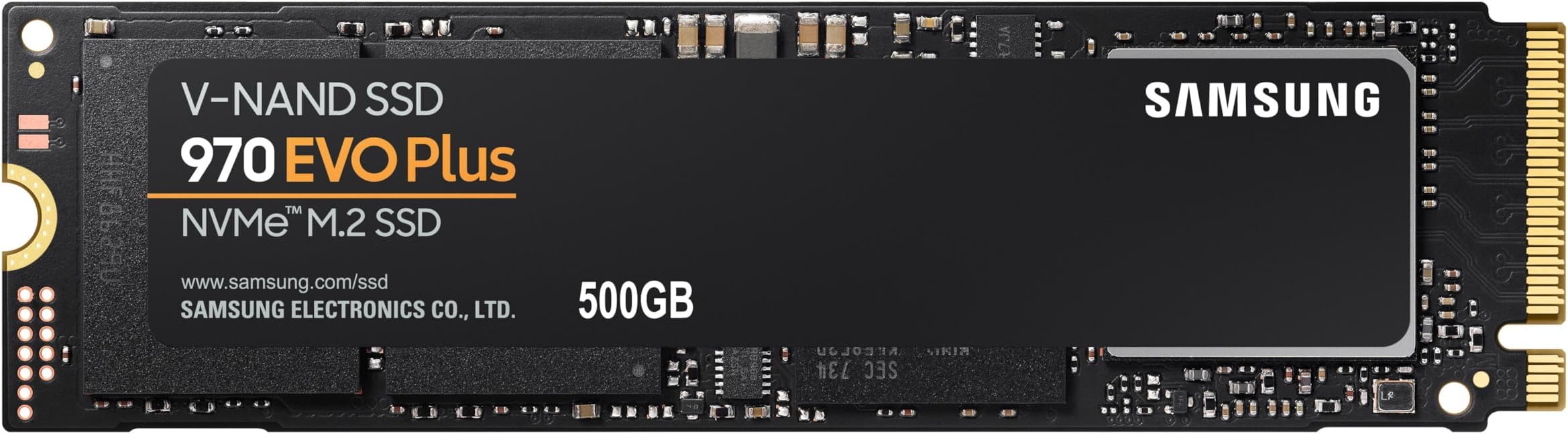
🚀 Upgrade your workflow with the SSD that means business — speed, security, and sleekness in one compact package!
The Samsung 970 EVO Plus MZ-V7S500BW is a 500 GB internal NVMe M.2 SSD delivering up to 3,500 MB/s sequential read speeds and 3,300 MB/s write speeds. Featuring advanced V-NAND technology and 256-bit AES encryption, it offers blazing-fast performance and robust data security in a compact 8.15 x 2.21 x 0.2 cm form factor. Ideal for professionals seeking rapid responsiveness and energy-efficient operation, it supports SATA backward compatibility and is backed by Samsung's reliable Magician software for easy drive management.


| ASIN | B07MFBLN7K |
| Best Sellers Rank | 72,166 in Computers & Accessories ( See Top 100 in Computers & Accessories ) 374 in Internal Solid State Drives |
| Box Contents | Samsung SSD 970 EVO Plus, installation instructions, user manual |
| Brand Name | Samsung |
| Cache Memory Installed Size | 512 |
| Color | Black |
| Compatible Devices | Desktop |
| Customer Package Type | Standard packaging |
| Customer Reviews | 4.8 4.8 out of 5 stars (25,248) |
| Data Transfer Rate | 48 Gigabits Per Second |
| Digital Storage Capacity | 500 GB |
| Enclosure Material | LTHB096 |
| Form Factor | M.2 |
| Global Trade Identification Number | 08801643628116 |
| Hard Disk Description | Solid State Hard Drive |
| Hard Disk Interface | PCIE x 4 |
| Hard-Drive Size | 500 GB |
| Hardware Connectivity | PCI Express 3.0 |
| Hardware Platform | PC |
| Installation Type | Internal Hard Drive |
| Item Dimensions L x W x Thickness | 8.2L x 2.2W x 0.2Th centimetres |
| Item Type Name | SSD |
| Item Weight | 8 Grams |
| Manufacturer | Samsung |
| Manufacturer Part Number | MZ-V7S500BW |
| Media Speed | Up to 3,300 MB/s |
| Model Name | SSD 970 EVO Plus |
| Model Number | MZ-V7S500BW |
| Network Connectivity Technology | PCIe Gen 3.0 x 4, NVMe 1.3 |
| Number of Items | 1 |
| Product Features | Backward Compatible |
| Product Warranty | Warranty Period 60;Months. Warranty period varies by model.For details about Samsung products specific warranty terms and conditions please follow the manufacturer website.. |
| Read Speed | 3500 Megabytes Per Second |
| Specific Uses For Product | Gaming |
| UPC | 767531889572 887276302546 887276729114 |
| Unit Count | 1.0 count |
F**K
All good, works after years, in harsh.
Got it for quite few years. Works fine. 60TB load on 500GB drive. Quite impressive. 98% life as reported by drive. Real or not. Time will tell. Full speeds as advertised. However. On the RIGHT drivers. Windows 7 heavily affected by driver quality/ source. Full speed constant 3000+ reads. Writes varies around NOT CONSANT 2000. HOWEVER. Drive's real (write) speeds are ONLY present, when it is been written at least ONCE, and with capacity reached. And overheating. No cooling - forget about any speeds. Reminder. Cooling applies to physical DRIVER chip of the drive, NOT the NVME modules. Driver on the drive wants cool. NVME wants the hot in operation. Hot driver chip will bring down drive to zero stop. ZERO. For several seconds/ minutes. This should be clear in every description. So. Testing must be done on ALL drive, written at least once, and with majority of capacity used. Love - as usually - when people do 0.01% drive size test, as any indication. And on fresh drive. Many of the drives CHEAT. Means. First portion of drive, which is tested is ultra fast, either physically or buffer. Mostly sd cards/ usb drives/ etc. But. Got Crucial nvme first, and it does exactly the same. 10GB ultra fast, then drops down to 1000 for the REST of the drive. As oppose most SSDs will perform 100% all drive day and out. So. Once you REALLY use the drive. Means written, not once, but several times, and used more capacity, drives starts to show REAL LIFE speeds. If you delete a file. Windows MUST physically delete a lot of drive. Not just entry in File allocation table. It will not do it in an instant, but on buffer. Try to switch off computer after deleting/ copying big files, and you wait for several minutes. Try to do massive files deletion, beyond treshold and windows has to do it here and now. For ages. Normally you won't notice, because it's all in background. On long switch on systems, absolutely not noticable. Try to copy serious data on maxed out drive, and you are for a big surprise on real speeds. Because majority of people get massive drives, to what they use, they won't notice. Paying several times for what they use. On Windows 7, due drivers and structure, massive bottle necks on writes. It's much more complicated than just 'test' or 'use', or capacity, or deletion. There is massive bottle necks on pcie resource allocation. If you have fast graphic card in use, your nvme drive is heavily bottlenecked. Only very expensive motherboards have this semi sorted. For majority of people, none of this would matter, they won't notice. But. For those who REALLY get NVMEs for the purpose, it does. Ah yes. Final word for all that lovely misinformation about defraging ssd/ nvme. It does indeed decrease drive's life, by zero point nothing. It does however increase the performance. For regular person, by zero point nothing. For serious use, servers, high capacity data storing, professional high speeds copying, for which all these drives are meant to exist, it does completely. Drives ssd/ nvmes have 'lost capacity', not shown on the tag, exactly for the purpose of internal 'defrag', on idle mode. Use the drive heavy in short bursts and speeds are dropping down. To zero. As drive has to operate on 'loss of power mode'. So. Hard lesson. With power loss or forced resets. Lots of data 'lost', because drive couldn't write it physically on time. As it takes a long while to zero data blocks, and then write tons of data from buffer. So. Defrag of ssds/ nvmes. You can defrag your drive as much as you please. And it will be zero point nothing of drive use. Windows uses drive endlessly and massively and constantly. Reads are not hurting. Writes are where drive's life is. And any windows writes trillions of times. I'm light user of pc. And my 500gb drive has 60'000gb of reads and writes (half half). Majority of which is Windows. Not me. So. If you are doing defrag, whenever you please, you will allocate for zero point nothing of drive's use. 99.9% of drives killing is done by windows. And hm.... Afer quite few years of using drive, and 60'000gb it's still 98% of life, as reported by drive. Real or not. Time will tell. Means you can use drive for 20 years before it will be dead. Majority of people will change drive a lot earlier than that (hdd 3-6 years, ssd 5 years at best, nvme first generation probably few years). In other words, defrag has completely no meaning to drive's life. Zero. It does have serious meaning to performance for serious - designed for - use. And for regular user. Exactly the bottleneck of capacity used and non defraged system, where drive will bottleneck in zeroing data and writing new one. Reading my own words, only high level IT people will understand. Thou - every user is affected, but is not aware. When copied tons of data, deleted tons of data, etc, thinking it's done, when bar is 100%. Reality, windows can still clear the data, hours after instruction, same with copying. Only exception is read only data in big files. Like movies. But then. How many users have data stored in adequate partitions. Read/ write/ rare/ often/ movies/ system/ etc.
S**R
Everything as smooth as silk
What can I tell you? I've given it 5 stars because, so far, the whole operation of purchase, delivery, installation, installation of OS, and use, has been as smooth as silk. I decide to build a new desktop DAW (Digital Audio Workstation) to run Ableton Live 10. And with the intention of connecting multiple audio and MIDI devices. I bought this Intel Mini PC from Amazon https://www.amazon.co.uk/gp/product/B07KPMWTQS/ref=ppx_yo_dt_b_asin_title_o01_s00?ie=UTF8&psc=1 . It's bare bones so needed a hard drive, memory, operating system and all the peripherals. I chose an M.2 type SSD after reading up on the internet about keeping down the heat generation and about operating speed. I chose this RAM for the same reason: https://www.amazon.co.uk/gp/product/B01BNJL8I4/ref=ppx_yo_dt_b_asin_title_o01_s01?ie=UTF8&psc=1. For installation, I followed the instructions supplied by Intel (on the web). It was simple enough, and quickly done. But I did take the precaution of wearing an anti- static wrist band and earthing myself to the Mini PC chassis. Installing the OS on the drive was also just a case of following the bouncing ball. This OS was a great price at the time and it came supplied with Windows 10 on a USB key: https://www.amazon.co.uk/gp/product/B0111YEG44/ref=ppx_yo_dt_b_asin_title_o01_s00?ie=UTF8&psc=1 But a much cheaper OEM version would do just as well. The PC boots up and Ableton opens up, all incredibly quickly. Installing any new USB device seems to happen in seconds. So I'd say the drive is working well with the PC and the RAM. Before I jacked up the permanent speed of the processor to around 4.45 Ghz from the standard 2.7Ghz, I don't think the PC fan operated at all, so I'd say, it's really not generating that much heat. So it's been one of those delightful (but sadly rare) experiences, when having chosen the product, then fitting it and using it just went very smoothly. I only have one pic, which shows the Mini PC itself... that measures a little over 10x10x5 cms and provides plenty of room for this M.2 SSD - I even have a Sandisk 2.5" SSD drive in there to hold my library files and it's certainly not "crowding" the Samsung.
G**)
Pro: Alte prestazioni: utilizza un interfaccia PCIe NVMe 3.0 x4, il che significa che può raggiungere velocità di lettura e scrittura sequenziali di 3.500 MB/s e 2.300 MB/s rispettivamente. Capacità di archiviazione elevata: offre una capacità di archiviazione di 512 GB, sufficiente per immagazzinare una grande quantità di file, come foto, video e programmi. Dimensioni ridotte: è un disco SSD M.2, che ha dimensioni ridotte rispetto ai dischi SSD standard. Ciò lo rende ideale per i sistemi a form factor ridotto, come i laptop ultraleggeri o i PC a forma di mini-torre. Durata: utilizza la tecnologia V-NAND per l'archiviazione dei dati, che ha una durata di vita maggiore rispetto agli hard disk meccanici. Garanzia: include una garanzia di 5 anni, il che garantisce che in caso di problemi con il disco, sarà possibile ottenere una sostituzione. Contro: Costo: il prezzo di questo disco SSD è più elevato rispetto ad altri modelli sul mercato. Non adatto a tutti i sistemi: poiché utilizza un interfaccia PCIe NVMe, potrebbe non essere compatibile con tutti i sistemi. Assicurarsi di verificare la compatibilità prima dell'acquisto. Non include un adattatore: se il sistema non dispone di uno slot M.2, sarà necessario acquistare un adattatore separatamente.
L**D
We got is yesterday 13th Jul, 2018. In image it is mentioned that product is made in Korea whereas we received Made in China. It feels bad to us. But product is working fine. Samsung Magician is showing as Genuine product. We are using it in Dell 7570. We look forward to own one 1TB 970 evo too. Once you buy it then you will install is in your system which will be having the UEFI mode by default. Kindly create the installation USB with UEFI mode using Rufus software then change your system BIOS setting to boot from USB then you will be able to install new window as well. Kindly change the drive format to gpt as well otherwise it will show you error saying you cannot install windows on this system. Following these steps you will be able to get new fresh windows installed and it works fine.
N**L
J'ai reçu la commande de remplacement après un souci avec la première commande.. le produit est excellent on sent la différence, ultra rapide le pc redémarre maintenant en 20 secondes au lieu des 56 avec mon précédent disque dur Juste un truc, une fois que vous le recevez il faudra installer une application pour le partitionner (il n'y a pas de volume dessus juste de l'espace libre et donc il ne sera pas détecter par le pc mais uniquement avec l'application samsung magician (indispensable) pour vérifier l'état de votre disque et d'y installer les prochains firmware
M**T
Ich habe die Samsung 970 EVO 500 GB NVMe M.2 SSD gekauft und bin total begeistert! Das anbringen der M.2 SSD war super einfach, und die SSD wurde sofort vom System erkannt. Sie ist unglaublich schnell – Windows bootet in wenigen Sekunden, und Spiele oder Programme starten schnell, eine normale SSD kommt dagegen nicht an. Die 500 GB bieten genug Platz für Betriebssystem, Apps und Games. Die SSD läuft zuverlässig. Für den Preis ein top Upgrade für jeden PC! Klare Empfehlung für alle, die Geschwindigkeit wollen!
R**N
produit très haut de gamme, le top des disque dur, excellent en vitesse et capacité, c'est le 2eme que j'achète, c'est dire si j'ai confiance dans le produit. en revanche en ce qui concerne l'installation j'ai enlevé une étoile car j'ai eu une petite difficulté, certes minime, pour l'installer. Je n'ai rien mit pour la longévité, car je n'ai pas de recul pour savoir s'il est vraiment fiable dans le temps, wait and see. j'ai aussi enlevé une étoile pour le rapport qualité/prix car je le trouve un peu cher, mais bon, c'est peut-être le prix de haut de gamme.
Trustpilot
1 month ago
3 weeks ago